Introduction to AI-Integrated Webcams
The emergence of AI-integrated webcams has revolutionized the way content creators engage with their audience on platforms such as Twitch and YouTube. These innovative devices leverage artificial intelligence technology to enhance video quality and streamline the streaming process, marking a significant leap forward in multimedia production. With the increasing demand for high-quality video output, understanding the functionalities of AI-integrated webcams is essential for both novice and experienced streamers.
“Heads up: Some of the links in this post are affiliate links. This means if you click on the link and purchase the item, I’ll receive an affiliate commission. This helps keep the lights on here at techdhami.com! Thanks for your support!”
One of the most notable features of these advanced webcams is their ability to provide exceptional video clarity and detail. By utilizing superior image processing algorithms, AI-integrated webcams ensure that video streams maintain high fidelity, even in varying lighting conditions. This enhancement plays a crucial role in captivating an audience’s attention, thereby improving viewer retention and engagement during live broadcasts.

- 1/1.28″Sensor — likely the largest ever in a webcam — delivers uncompressed 4K/30fps and 1080p/60fps video. Sensor size …
- Fast PDAF Autofocus: Instant zero-lag focus. Ensures crisp, blur-free close-ups, keeping you perfectly in frame
- AI Enhanced Imaging: 2.5x clearer faces and finer details in low light. Auto-tuned by AI with smart exposure, white bala…
Another critical aspect of AI-integrated webcams is the incorporation of auto-framing technology. This feature allows the camera to automatically adjust its focus and positioning based on the user’s movements. For example, during a streaming session, if the creator moves away from the center of the frame, the webcam intelligently recalibrates to keep the individual in focus. This adaptability not only results in a more professional presentation but also provides a seamless viewing experience without manual adjustments. Streamers can express their creativity and engage freely with their audience without the constraints of fixed camera angles.
In conclusion, the integration of AI technology into webcams offers substantial benefits for content creators. As the streaming landscape continues to evolve, investing in a high-quality AI-integrated webcam with features like auto-framing can significantly enhance the overall production value and effectiveness of live-streaming endeavors. It is thus pivotal for aspiring and current creators to familiarize themselves with these tools to maximize their potential on platforms like Twitch and YouTube.
The Importance of Auto-Framing in Streaming
In the world of live streaming, particularly on platforms like Twitch and YouTube, maintaining a strong connection with the audience is essential. One innovative feature that significantly enhances this connection is auto-framing. This technology allows streamers to remain visually centered in the frame, even as they move around during their broadcast. As a result, viewers can focus on the content being presented without being distracted by awkward camera angles or off-screen moments.
Auto-framing works by utilizing advanced algorithms and AI technology to analyze the streamer’s movements in real-time. This ensures that the camera adjusts seamlessly to keep the streamer within the optimal viewing area. Such functionality is particularly beneficial during dynamic streams, where the streamer may lean closer to the camera or turn away momentarily. The fluid adjustments provided by auto-framing contribute significantly to a polished and professional-looking stream.
Moreover, the significance of auto-framing extends beyond just enhancing visual appeal. Engagement is key in the streaming community; thus, keeping the audience’s attention is crucial. By consistently centering the streamer, auto-framing minimizes distractions that could cause the audience to tune out. It facilitates a richer, more immersive viewer experience, which is a fundamental component for building loyal followers.
In conclusion, auto-framing is not merely a convenience for streamers; it is an essential feature that enhances the overall quality of live broadcasts. By ensuring that the streamer remains the focal point during varied movements, this technology plays a vital role in engaging audiences and fostering a community around the content being shared.

- 【Tiny in Size, Titan in Performance】OBSBOT Tiny 3 Lite 4k webcam packs professional-grade imaging and audio into a compa…
- 【Flagship 4K Imaging for Creators】Unleash stunning 4K@30FPS or 1080p@120FPS video, thanks to a 1/2” CMOS sensor, HDR, an…
- 【AI Spatial Audio with Voice Locator】Featuring a tri-mic array with directional MEMS mics, this webcam with microphone l…
Top Features to Look For in AI-Webcams
When selecting an AI-integrated webcam for streaming on platforms like Twitch and YouTube, there are several critical features that should guide your choice. One of the most significant aspects is image resolution. A webcam with high resolution, typically 1080p or higher, ensures that viewers receive a crystal-clear video feed, enhancing the overall viewing experience. This clarity is especially important for gamers and content creators who want to engage their audience effectively.
Frame rate is another important factor to consider. A higher frame rate, such as 60 frames per second (fps), allows for smoother video playback, which is crucial during fast-paced gaming or dynamic presentations. This smoothness can heavily influence viewer retention and satisfaction, making it a prominent feature during your selection process.
Autofocus capability is also essential in an AI-webcam. Streamers often move around during their broadcasts, and a webcam that can adjust focus automatically ensures that the subject remains sharp and in clear view. This feature can greatly diminish distractions caused by a blurry image, maintaining engagement with the audience.
Additionally, consider the lighting adjustments capabilities of the webcam. Streamers frequently operate in varied lighting conditions; therefore, a webcam equipped with advanced light correction features can help adapt to different environments, resulting in consistently well-lit footage. This functionality enhances image quality, which is particularly beneficial when streaming in low-light scenarios.
Lastly, ease of use is a key characteristic that should not be overlooked. A user-friendly interface and straightforward installation process can significantly improve the overall experience of setting up the device. Selecting a webcam that is compatible with various streaming software and does not require complex configuration will allow for a seamless integration into your streaming setup.
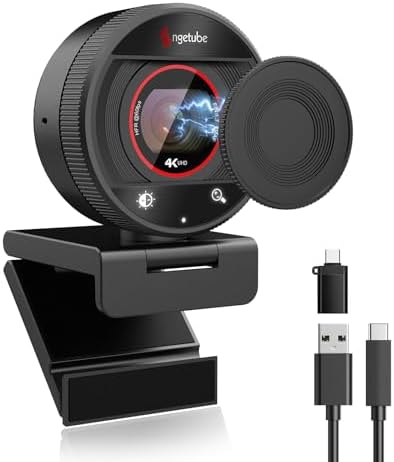
- 【Ultra HD 4K & 1080P @ 60FPS】 The Angetube 4K webcam delivers razor-sharp Ultra HD 4K and 1080P@60FPS recordings – perfe…
- 【PDAF Fast Focus】Experience lightning-fast 0.3s Phase Detection Auto Focus (PDAF) that keeps you perfectly sharp during …
- 【Magnetic Privacy Cover】873max Webcam with Magnetic Privacy Cover. Your privacy is our priority. The unique magnetic cov…
Review of the Best AI-Integrated Webcams
In the world of content creation, choosing the right webcam can significantly impact the quality of streams on platforms like Twitch and YouTube. With advancements in technology, AI-integrated webcams have emerged as a popular choice among streamers due to features like auto-framing, which enhances viewer engagement. Here, we review some of the top models available on the market, focusing on performance, features, price, and user feedback, particularly concerning their auto-framing capabilities.
The Logitech StreamCam is among the best AI-integrated webcams currently available. It offers 1080p video quality at 60 frames per second, ensuring smooth streaming. One of its standout features is its ability to automatically adjust the frame according to the user’s movements, making it particularly user-friendly for live streaming on Twitch. Additionally, it comes equipped with dual front-facing microphones, improving audio quality without the need for additional equipment. Priced at around $150, it strikes a balance between affordability and advanced features.
Another excellent option is the Razer Kiyo Pro. This webcam utilizes a high-definition sensor and provides superior low-light performance, which is crucial for streamers who operate in dimly lit environments. The auto-framing function works seamlessly, keeping the subject centered even with movement. The Kiyo Pro’s price point is slightly higher, around $200, but its features justify the cost for serious content creators prioritizing quality.
Lastly, the Elgato Facecam is tailored for professional streamers, focusing on providing high-quality video without unnecessary frills. Priced at approximately $200, it combines solid auto-framing technology with a versatile focal range. User feedback highlights its reliability and consistent performance, making it a worthy investment for streamers looking to elevate their production quality.
These options showcase the best AI-integrated webcams currently available, each offering unique features suited for various streaming needs. Choosing the right model can enhance the overall streaming experience, ensuring both content quality and viewer engagement.

- Ultra HD 4K webcam: meet or stream in 4K resolution at 30fps or 1080p at 60fps, with our webcam sensor, with 70% larger …
- AI-enhanced image quality: Experience 2x better face visibility with finer image details in difficult light, with auto-e…
- Curate Your Image: Fine controls on this Ultra HD webcam let you adjust lighting and white balance, such as ISO, Shutter…
Comparison of Pricing and Value for Money
When it comes to choosing the best AI-integrated webcams with auto-framing features for platforms like Twitch and YouTube, pricing plays a pivotal role in the decision-making process. The market offers a wide range of options, from budget-friendly models to premium devices, each boasting unique capabilities and performance levels.
Starting with budget-friendly options, several webcams are available priced under $100. These models generally provide essential functionality like 720p or 1080p resolution and basic auto-framing capabilities. While they may not include advanced features like facial recognition or enhanced low-light performance, they offer a solid choice for novices or content creators just beginning their streaming journey. Products such as the Logitech C270 or the Microsoft LifeCam HD-3000 stand out as reliable choices in this price range, effectively meeting the needs of entry-level users without compromising on essential quality.
On the other hand, mid-range and high-end options can range from $150 to over $300. Models like the Elgato Facecam and the Razer Kiyo Pro stand out for their superior build quality, high-definition video output, and advanced auto-framing capabilities. They often feature better sensors, more frame rates, and customizable settings that cater to serious content creators looking to enhance their production quality. For those willing to invest a bit more, these higher-end options can ultimately provide superior value for money, especially when considering longevity and versatility.
In conclusion, the best value webcam will largely depend on individual needs and budget. While entry-level models serve well for casual use, those committed to improving their streaming setup may find the investment in a premium webcam worthwhile for the enhanced features and reliability they offer.
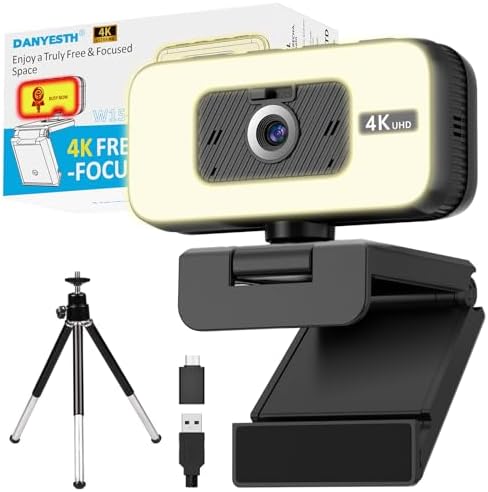
- 【True 4K Upgrade from Built-In Laptop Cameras】 This 4K webcam for PC is powered by a SONY 1/2.55” sensor (3840×2160P), d…
- 【Made for Home Office & Remote Work Comfort】 Designed for real home use, this webcam with light features a 「Busy Now」 do…
- 【Adjustable Webcam Light for Day & Night Video Calls】 Perfect for evening or low-light environments, this 4K webcam incl…
User Experiences and Testimonials
When evaluating AI-integrated webcams with auto-framing capabilities, user experiences provide crucial insights into their practical performance, especially for platforms like Twitch and YouTube. Overall, feedback varies significantly, showcasing both strengths and weaknesses of these innovative devices.
Many users have praised the auto-framing feature for its ability to seamlessly track movement. Streamers have reported that during live broadcasts, the webcams can adjust to their positioning, keeping them in focus without the need for manual adjustment. One user remarked, “The auto-framing makes it feel like I have a personal camera assistant during my streams, allowing me to engage more dynamically with my audience.” This feature is particularly beneficial during interactive gaming sessions, where maintaining visual engagement is paramount.
However, not all feedback has been entirely positive. Some users have encountered issues with the camera’s ability to accurately frame them, particularly in well-lit environments or when using different backgrounds. A user highlighted, “While I appreciate the technology, there are times when the framing gets wonky, especially if I’m sitting at an odd angle or if my background changes frequently.” This suggests that while the technology is promising, it may not be foolproof and can be susceptible to environmental conditions.
Aside from the auto-framing functionality, users have also commented on general image quality and ease of use. Many report vivid colors and sharp resolution, making streaming sessions visually appealing. Nonetheless, a few users noted compatibility issues with certain broadcasting software, indicating variability across different platforms. This reflects the need for buyers to consider their specific streaming setups when choosing an AI-integrated webcam.
Ultimately, user testimonials reflect a balance of satisfaction and areas needing improvement, reinforcing that while these webcams are impressive, personal expectations and unique streaming environments play a significant role in user experiences.

- 4K UHD resolution: Built-in 1/2.55″ 12.2MP UHD CMOS sensor, Supporting resolutions and frame rates ranging from 4K@30FPS…
- AI AutoFocus & Auto Light Adjustment: Equipped with AI technology, the webcam 4K handles dynamic meeting environments an…
- Dual Noise-Cancelling Mics & Flexibel Design: The 4K webcam boasts two built-in omnidirectional microphones, strategical…
Installation and Setup Guide
Setting up an AI-integrated webcam with auto-framing technology is a straightforward process that can significantly enhance your streaming experience on platforms such as Twitch and YouTube. The first step involves selecting a compatible webcam. Ensuring the device supports AI features and auto-framing capabilities is essential for optimal performance. Once you have your webcam, unpack it and make sure you have all the necessary components, including any cables or mounting hardware.
To begin the installation, plug the webcam into a suitable USB port on your computer. Most AI webcams are plug-and-play devices, meaning your OS should recognize them automatically without requiring additional drivers. However, it’s advisable to visit the manufacturer’s website to download the latest drivers and software updates to leverage all functionalities of the camera, including advanced settings that enhance the auto-framing experience.
After the drivers are installed, launch the webcam software provided by the manufacturer. This software generally includes settings for adjusting resolution, frame rate, and auto-framing features. To make the most of the auto-framing technology, ensure that your camera’s field of view is clear of obstructions and that the lighting is adequate. A well-lit environment ensures better image quality, which is imperative for effective auto-framing.
In the software settings, locate the auto-framing option and enable it. Most advanced webcams allow you to customize the frame size and tracking sensitivity, which optimizes how the camera follows your movements. It is beneficial to test these settings before your stream. You can do this by recording a short video to see how well the framing works. Adjust the settings as necessary to achieve the best results. Finally, run a trial broadcast to make sure everything functions smoothly during your actual stream.
- 4K UHD resolution: Built-in 1/2.55″ 12.2MP UHD CMOS sensor, Supporting resolutions and frame rates ranging from 4K@30FPS…
- AI AutoFocus & Auto Light Adjustment: Equipped with AI technology, the webcam 4K handles dynamic meeting environments an…
- Dual Noise-Cancelling Mics & Flexibel Design: The 4K webcam boasts two built-in omnidirectional microphones, strategical…
Troubleshooting Common Issues
As with any technology, AI-integrated webcams can sometimes present users with a range of challenges during operation. Understanding these common issues and their solutions can significantly enhance your streaming experience on platforms like Twitch and YouTube.
One prevalent problem is the webcam not detecting the user or failing to auto-frame correctly. This could stem from insufficient lighting conditions or an obstructed field of view. It is advisable to ensure adequate lighting and minimize clutter in the background. Adjusting the position of the camera may also help it to accurately track your movements and frame you appropriately.
Another issue may arise with the camera’s connection to your streaming software. Users often experience delayed video feed or pixelation. This can be addressed by checking the USB connections and ensuring that the drivers are updated. Additionally, closing unnecessary applications running in the background can free up system resources, enhancing video performance.
Audio synchronization issues can also occur with AI webcams equipped with built-in microphones. If the video is out of sync with your audio, check the audio delay settings within your streaming software. Reducing this delay may remedy the issue. Alternatively, using an external microphone can improve sound quality and ensure accurate synchronization.
Lastly, if your webcam produces poor-quality video output despite appearing operational, consider adjusting the video resolution settings. Streaming platforms often allow you to set the preferred video quality, which can greatly influence performance based on internet bandwidth.
By recognizing these common issues and employing the suggested solutions, users can efficiently manage any technical difficulties that may arise during their streaming sessions.

- EXCEPTIONAL 2K QHD CLARITY WITH SONY STARVIS SENSOR – Capture stunningly clear and vibrant video with a 2K QHD (1440p) r…
- AI AUTO FRAMING FOR PERFECTLY CENTERED VIDEO CALLS – Stay at the center of attention with AI-powered auto framing, which…
- ADVANCED DOL-HDR and NOISE REDUCTION TECHNOLOGY – Experience true-to-life colors and enhanced contrast with Digital Over…
Conclusion and Final Thoughts
In conclusion, selecting the right AI-integrated webcam with auto-framing capabilities is crucial for streamers on platforms like Twitch and YouTube. These advanced webcams not only enhance the overall quality of your stream but also simplify the shooting process by automatically adjusting the frame to include the subject optimally. As discussed, the market offers a range of options from various manufacturers, each bringing unique features tailored to different streaming needs.
The significance of investing in a quality webcam becomes apparent when considering the demands of a professional streaming environment. Features such as superior image clarity, low light performance, and seamless integration with streaming software can greatly enhance viewer engagement and overall production value. When evaluating various options, streamers should also consider their specific context—such as space constraints, lighting conditions, and the type of content being produced—to choose a model best suited to their requirements.
Ultimately, the variety of AI-integrated webcams on the market today ensures that there is a suitable choice for every streamer, from beginners to seasoned professionals. Each model’s individual strengths, such as advanced AI capabilities and ease of use, cater to different streaming styles and preferences. Thus, taking the time to research and select the most appropriate webcam can make a significant difference in the quality and effectiveness of your content creation efforts.
As technology continues to evolve, the incorporation of AI in webcams promises a future where streaming becomes increasingly user-friendly and engaging. Streamers should remain informed about new developments and innovations in webcam technology to stay ahead in the competitive online landscape.