Understanding Micro-SD Card Types
When selecting a micro-SD card for your emulator handheld, understanding the various types available is crucial to ensure compatibility and optimal performance. The most common formats include SD (Secure Digital), SDHC (Secure Digital High Capacity), and SDXC (Secure Digital Extended Capacity). Each of these formats offers different storage capacities and performance characteristics.
The original SD cards have a storage capacity ranging from 2 MB up to 2 GB, which is often insufficient for modern needs. They are gradually becoming less common in the current market, especially for emulators that require larger libraries of games. For those using older devices or applications that specifically support SD cards, these might still be viable options.
Transitioning to SDHC cards, these can hold anywhere from 2 GB to 32 GB of data. This increased capacity makes SDHC cards far more practical for handheld emulators, allowing users to store more games, media, and applications without the frequent need for card swaps. However, it is essential to note that not all older devices support SDHC, so ensuring device compatibility is a must.
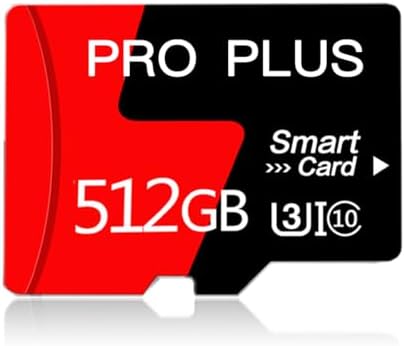
- Expand your device's memory with massive 512GB capacity - perfect for storing thousands of photos, hours of HD videos, e...
- Experience smooth data transfer with Class 10 speed rating, ideal for everyday use including 1080p HD video recording, q...
- Works flawlessly with various devices including Android smartphones, tablets, Nintendo Switch, dash cams, security camer...
On the other hand, SDXC cards significantly expand storage potential, offering capacities from 32 GB up to 2 TB. These cards are ideal for power users who require ample space for extensive game libraries. They come with faster read and write speeds, making them suitable for performance-intensive applications and ensuring smooth gameplay. However, as with SDHC, compatibility should be checked against your specific handheld emulator, as not all devices are designed to work with SDXC.
In summary, choosing the right micro-SD card involves not only assessing storage capacities but also ensuring compatibility with your handheld device. Understanding these formats will aid in making an informed decision that aligns with both your storage needs and device specifications.
Capacity Requirements for Emulator Handhelds
Choosing the right micro-SD card for your emulator handheld is crucial for optimizing gaming performance. One of the primary factors to consider is the capacity of the micro-SD card, which directly impacts how many games can be stored and played seamlessly. Typically, the size of games varies among platforms and can range from as little as a few megabytes to several gigabytes. Understanding the common game sizes will help you evaluate your storage needs effectively.
For instance, retro games from consoles like the NES or SNES usually occupy between 500 KB to 10 MB per title, allowing a micro-SD card with a capacity of 16GB or 32GB to accommodate hundreds of such games. On the other hand, more demanding titles from the PlayStation or Nintendo 64 can take up anywhere between 100 MB and 1.5 GB each. Under these circumstances, a micro-SD card with at least 64GB or larger might be more appropriate if the user intends to run multiple games from these platforms.
Moreover, if a user is interested in running games from a variety of systems, they should anticipate a significant increase in storage requirements. A micro-SD card with capacities ranging from 128GB to 512GB will provide more flexibility when selecting which games to install. These higher-capacity cards not only support a greater number of titles but can also accommodate additional content like save files and DLC, which are becoming more common in the gaming landscape.
Ultimately, selecting the ideal micro-SD card for your emulator handheld hinges on an understanding of both average game sizes and personal gaming preferences. Taking into account how many games you wish to store will guide you towards the best storage option to ensure a smooth gaming experience.
- Expand your device's memory with massive 512GB capacity - perfect for storing thousands of photos, hours of HD videos, e...
- Experience smooth data transfer with Class 10 speed rating, ideal for everyday use including 1080p HD video recording, q...
- Works flawlessly with various devices including Android smartphones, tablets, Nintendo Switch, dash cams, security camer...
Speed Class Ratings Explained
When selecting a micro-SD card for your emulator handheld, one of the critical factors to consider is the speed class ratings. These ratings are designed to ensure that data transfer speeds meet the performance requirements necessary for high-quality gaming experiences. Micro-SD cards come with several speed classifications such as Class 2, Class 4, Class 6, Class 10, UHS-I, and UHS-II, each representing different minimum write speeds.
Class 2 cards offer a minimum write speed of 2MB/s, making them suitable for low-definition video recording and simple applications. In contrast, Class 4 and Class 6 cards support higher minimum write speeds of 4MB/s and 6MB/s, respectively, making them more suitable for basic gaming and standard video recording. However, for more demanding operations, especially when using emulator handhelds to play graphics-intensive games, Class 10 cards are recommended as they provide a minimum write speed of 10MB/s.
For users seeking exceptional performance, UHS (Ultra High Speed) ratings come into play. UHS-I cards support a theoretical maximum speed of 104MB/s, while UHS-II cards can achieve speeds up to 312MB/s. This increase in speed significantly enhances game loading times and provides a smoother gameplay experience, minimizing lags and interruptions. It is essential to pair your emulator with a compatible micro-SD card that meets or exceeds these recommended speed classes to ensure optimal performance.
In terms of gameplay experience, the speed class rating directly influences how fast games load and how efficiently they run. A micro-SD card with a higher speed class rating not only allows for quicker loading times but also provides a more responsive experience when accessing game files or saving progress. Choosing the right speed class rating is therefore essential for maximizing the performance of your emulator handheld.
Compatibility and Branding Considerations
When selecting a micro-SD card for your handheld emulator, understanding compatibility and branding is paramount. Not all micro-SD cards perform equally well with every emulator system. The first step is to consult the emulator’s specifications or user manual to determine the maximum supported capacity and speed class. Many handheld emulators operate optimally with cards that have a capacity ranging from 16GB to 256GB, though high-performance models may support larger sizes. Additionally, ensuring that the micro-SD card meets the required speed class, such as UHS-I or UHS-II standards, is vital, especially for demanding applications and larger game files.
When considering brands, it's advisable to opt for established manufacturers known for reliability and performance. Brands like SanDisk, Samsung, and Kingston have built reputations over time for offering high-quality micro-SD cards with superior endurance and faster read/write speeds. Conversely, off-brand options may initially appear attractive due to their lower price points; however, they often come with risks. Issues such as slower data transfer rates, faulty storage, and data corruption are frequently reported with these alternatives. Reading reviews and checking ratings from credible sources can help you gauge the reliability of specific card models.
Furthermore, compatibility can also extend to how these micro-SD cards interface with various file systems and formats. Many handheld emulators require cards to be formatted in FAT32 or exFAT to function properly. As such, it's essential to check that the card can be formatted correctly, which further emphasizes the importance of choosing a reputable brand. By prioritizing compatibility and sticking with reliable brands, users can enhance their gaming experience and prolong the life of their devices.

- Ideal for Android smartphones and tablets
- 32GB to store even more hours of Full HD video
- Up to 120MB/s transfer speeds let you move up to 1000 photos in a minute
Reading Reviews and User Feedback
When selecting the right micro-SD card for your emulator handheld, it is imperative to engage in thorough research, particularly focusing on product reviews and user feedback. This practice not only informs potential purchasers about the quality and performance of the product but also provides insights into its reliability over time. To begin your research, consider navigating to reputable technology review websites that specialize in storage solutions. These platforms often conduct exhaustive tests and provide professional recommendations based on performance metrics.
Additionally, consumer platforms such as Amazon, Best Buy, or Newegg include user-generated feedback that can reveal potential pros and cons of specific micro-SD card models. Pay close attention to both positive and critical reviews. Analyzing the experiences of other users can help you gauge whether certain models consistently perform well with various emulators, ensuring that the chosen card meets your gaming requirements.
While examining reviews, it is crucial to identify common themes in user feedback. For instance, frequent mentions of high speed, durability, and failure rates may indicate an overall performance quality. It is advisable also to take note of comments regarding compatibility with different emulator handhelds, as not all micro-SD cards work seamlessly with every device. Furthermore, consider looking for reviews that discuss the card's long-term usage and how it handles extensive read and write cycles typical in emulator gaming.
Ultimately, thorough research into product reviews and user experiences can guide you in selecting a micro-SD card that aligns well with your emulator handheld needs, enhancing your gaming experience while minimizing potential issues.
Price vs. Value: Finding the Best Options
When considering micro-SD cards for your emulator handheld, it's important to scrutinize the price spectrum while balancing it with the overall value offered by each product. The market presents a range of micro-SD cards at various price points. While it can be tempting to select the cheapest option available, this could lead to compromised performance and reliability, which is particularly detrimental for gaming applications.
Budget constraints are a common consideration among consumers; however, investing in a good quality micro-SD card can significantly enhance the gaming experience. Higher-quality cards often exhibit superior read and write speeds, which can affect load times and overall gameplay performance. Especially when emulating more demanding titles, the speed of the micro-SD card can make a tangible difference.
It's also crucial to consider brand reputation when making a purchase. Established brands often provide more reliable cards that come with better warranties, indicating their commitment to quality. User reviews can further guide you in understanding how a specific card performs in real-world applications, contributing to your assessment of its value.
Ultimately, while it is essential to remain within your budget, carefully weighing the additional cost of a higher-quality micro-SD card against the performance benefits can lead to a more satisfying gaming experience. In many cases, an investment in a more expensive card proves to be worthwhile, especially if it prolongs the life of your emulator handheld and enhances gameplay. Choose wisely, balancing your budget with the quality and speed required for an optimal gaming experience.
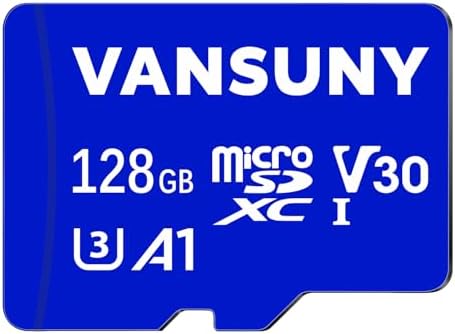
- 【Versatile microSD】This micro SD card frees up more storage space on your device to shoot more and faster, ideal for And...
- 【Ultra-fast speed】This Class 10 U3 micro SD card utilizes UHS-I technology to boost up to 90MB/S read speed and 30MB/S w...
- 【4K Video Recording】This 128GB V30 micro SD card provides high speed and large capacity to capture continuous including ...
Installation and Formatting Before Use
Before using a micro-SD card in your emulator handheld, it is vital to correctly install and format the card to ensure optimal performance. This process not only helps in efficient data management but also minimizes risks associated with potential data loss or card damage.
First, begin by inserting the micro-SD card into the appropriate slot on your emulator device. Ensure that the card is aligned properly according to the device's design; forcing it into place could lead to physical damage. Some devices may require the card to be seated until it clicks into place to confirm it is secure.
After installation, the next crucial step is formatting the micro-SD card. Most emulator devices will prompt you to format the card upon first use. If such a prompt does not appear, navigate to the device settings to find the format option. This step is essential as it prepares the card for file storage compatible with the emulator's system.
It is advisable to format the card using the FAT32 file system, as this format is widely recognized by various operating systems and devices. Confirm that you have backed up any important data before performing the formatting process since this action will erase all existing data on the card. To format, select the option to erase, and follow the on-screen instructions to complete the process.
To avoid common mistakes, ensure that your micro-SD card is from a reputable manufacturer as low-quality cards may corrupt or fail prematurely. Additionally, safeguarding against power interruptions during the formatting process is crucial, as these can cause errors that may render the card unusable. By adhering to these guidelines, users can maximize their micro-SD card's functionality and longevity within their emulator handheld.
Tips for Maintaining Your Micro-SD Card
Maintaining your micro-SD card is crucial to ensuring longevity and optimal performance, especially when using it with emulator handheld devices. One of the most important practices is managing data transfers carefully. Always use a reliable card reader when transferring files to and from your micro-SD card. Avoid removing the card during data transfers, as this can cause corruption. Ensuring that any writing or reading processes have fully completed before ejecting the card prevents data loss and potential damage.
Another significant factor in maintaining micro-SD card health is proper storage. When you are not using your micro-SD card in your emulator handheld, store it in a protective case that shields it from dust, moisture, and physical damage. Avoid exposing the card to extreme temperatures or direct sunlight, which could degrade its components over time. Never leave it in a device that is prone to shocks or drops, as physical impacts can lead to internal damage.
Moreover, it's wise to periodically run checks on your micro-SD card. Most operating systems include tools to check disk integrity, which can highlight any potential issues early. Make it a habit to back up your data regularly. This not only protects your data but also allows you to format the card every few months to refresh its performance. Finally, be cautious with applications that heavily write data, as constant rewriting can reduce the lifespan of your micro-SD card. By adhering to these best practices, users can prolong their micro-SD card's lifespan while minimizing the risk of encountering issues.

- [4K UHD supported] Read/Write up to 100/60 MB/s. 4K UHD video displaying/recording, UHD 4K Gaming, Share your beautiful ...
- [App] A1 Grade for better app loading performance on smartphones & tablets.
- [Compatibility] Come with 2 SD adapters and 2 mini cases. Compatible with high-speed camera, DSLR, camcorder, drone, gam...
Conclusion and Final Recommendations
Choosing the right micro-SD card for your emulator handheld is crucial in enhancing your gaming experience. Throughout this guide, we have discussed various aspects that should be considered when making this decision. Firstly, it is important to evaluate the storage capacity based on your gaming needs. Whether you plan to store just a few titles or a comprehensive library of games, selecting a micro-SD card with an adequate capacity is necessary to prevent any interruptions.
Next, compatibility plays a significant role in ensuring smooth operation. Always verify that the chosen micro-SD card meets the specifications required by your emulator handheld. This includes both the format type and speed class. Opting for a high-speed micro-SD card can drastically affect loading times and overall performance, providing a smoother gameplay experience.
Additionally, consider the reliability and brand reputation of the micro-SD card. Investing in a card from a well-known manufacturer can save you from potential issues associated with lesser-quality products. It is also wise to monitor user reviews and performance ratings for insight into the card's durability and speed. Price should not be the sole factor in your decision, as a balance between cost and quality often leads to the best results.
In conclusion, carefully weighing your options and understanding your specific gaming requirements will lead you to the optimal micro-SD card for your emulator handheld. By focusing on capacity, compatibility, and reliability, you can make an informed choice that ensures an enjoyable gaming experience. Remember to conduct thorough research and pick a micro-SD card that best suits your needs, maximizing both functionality and enjoyment in your gaming journey.



0 Comments