Introduction to Benchmarking Your Custom PC
Benchmarking is a critical process in evaluating the performance of a custom-built PC. This practice involves running specific tests to assess the capabilities and efficiency of various components, providing valuable insights into how well the system performs under different conditions. Understanding the significance of benchmarking is essential for anyone looking to optimize their custom PC build.
The primary benefit of benchmarking is the ability to identify performance bottlenecks that may hinder the system's capabilities. For instance, through benchmarking, users can pinpoint whether the CPU, GPU, or storage drives are limiting overall performance. By finding these weak links in the system, adjustments can be made, such as overclocking components or upgrading hardware to ensure a smoother and more efficient operation.

- 👐 🔧【Widely & Easily Used】 Precision network cable tester suits for RJ45 Ethernet (Cat5/Cat5e/Cat6a/Cat7) and RJ11 teleph...
- 🛡️ ⚡【POE Anti-Burn & Fault Detection】Features exclusive 100M PoE Anti-Burn Protection, safely testing connected cables w...
- 🔋🔋【Dual Power & Long-Distance Testing】LAN network cable tester support dual power supply: 9V battery (NOT INCLUDED) or p...
Another key advantage of benchmarking is the ability to compare performance metrics against industry standards or similar custom builds. This comparative analysis allows users to place their system in context, understanding how it stacks up against others in terms of speed, responsiveness, and overall capability. Such insights can guide decisions about future upgrades or adjustments necessary to achieve the desired level of performance.
Additionally, benchmarking verifies whether the components within a custom PC are functioning optimally. It provides a clear picture of whether each part is performing as expected after installation or servicing. Regular benchmarking can also help in maintenance, ensuring that the system remains in peak condition over time.
In summary, benchmarking your custom PC is an invaluable tool for maximizing performance, facilitating informed decisions about upgrades, and ensuring components are running efficiently. Through methodical testing and analysis, users can guarantee their systems are well-optimized to meet their specific needs and demands.
Understanding Benchmarking Tools and Software
Benchmarking is an essential aspect of evaluating a custom-built PC's performance. It allows users to assess the capabilities of their hardware components and software configurations. Various benchmarking tools and software are available to cater to different types of tests, including synthetic benchmarks and real-world application tests. Synthetic benchmarks provide a controlled environment to measure performance metrics by simulating workloads, while real-world benchmarks evaluate performance based on actual applications and gaming scenarios.
One of the most widely recognized tools for CPU benchmarking is Geekbench. This software offers a comprehensive assessment of both single-core and multi-core performance, providing a useful score that allows users to compare their CPUs to others. For GPU testing, 3DMark is the go-to resource, featuring a suite of tests that simulate intensive gaming situations and graphical loads, helping to determine how well a graphics card performs under pressure.
Memory benchmarking is vital for ensuring your RAM operates efficiently. Tools like MemTest86 are designed to test the integrity of RAM by running extensive checks against its performance, identifying potential issues that could affect stability. Another great option is AIDA64, which not only tests memory speeds but also provides detailed information on system health and diagnostics.
In addition to these, there are also tools like PCMark which offer a suite of tests for overall system performance, focusing on a broad range of tasks that mimic everyday use. By integrating these benchmarking utilities into your PC evaluation process, you can achieve a better understanding of your system's performance and make informed decisions on potential upgrades or configurations.

- 【Entry-Level Multimeter】Assark Multimeter is good for measuring AC/DC voltage, DC current, resistance, continuity, diode...
- 【Pocket Digital Multimeter】Designed for easy carrying and storage, the Digital Multimeter is pocket and smaller than oth...
- 【Safe Design】Provide overload protection on all ranges with the two built-in fuses and thick rubber cover, the Voltmeter...
Preparing Your PC for Benchmarking
Before initiating any benchmarking process for your custom-built PC, it is essential to prepare the system adequately. This preparation helps ensure that the results are both accurate and reflective of your system's true performance capabilities. The first step involves performing system updates. Keeping your operating system up to date is crucial, as updates often include performance enhancements and fixes that can significantly affect benchmark results.
Next, focus on ensuring that all drivers are current. Graphics card drivers, motherboard chipset drivers, and storage device firmware are particularly important. Outdated drivers may not fully leverage the performance metrics of the hardware, leading to misleading benchmark results. Therefore, checking the manufacturer's website for the latest driver versions is advisable.
Optimal power settings also play a critical role in preparing your system for benchmarking. It is recommended to set the power plan to 'High performance' within the Windows Power Options. This setting prevents the system from throttling performance to save power, particularly during intensive benchmarking processes. Further, disabling any background applications and unnecessary startup processes can free up system resources, allowing the benchmarks to run without interference from other programs.
Temperature management is another vital consideration. Extreme temperatures can lead to throttling and inaccurate results. It is advisable to monitor CPU and GPU temperatures to ensure they remain within safe operating limits. Utilizing software to track temperature while benchmarking can provide insights into whether the cooling configuration is adequate. If necessary, consider optimizing airflow within the case or upgrading the cooling system to manage temperatures effectively.
In summary, a thorough preparation phase is crucial for achieving reliable benchmarking results for your custom-built PC. By keeping the system updated, ensuring drivers are current, optimizing power settings, and managing temperatures, you can set the stage for a successful benchmarking experience.

- BOSEAN Geiger counter FS5000: This nuclear radiation detector with built-in J321 GM sensor, fast response time and high ...
- 4 Alarms Methods: This nuclear radiation dosimeter vibration, light, audible and display 4 combined alarm modes. Enter t...
- 30 days long endurance: Low power consumption and long endurance; Consumption <15mw; Activating the low power mode allow...
Running CPU Benchmarks
Benchmarking the CPU is a crucial step in understanding the capability and performance of your custom-built PC. To begin, select appropriate CPU benchmarking tools tailored for various performance metrics. Some of the leading options include Cinebench, PassMark, and Geekbench, each offering unique testing methodologies. These tools provide a comprehensive picture of how your CPU performs under different workloads, including both single-core and multi-core scenarios.
Setting up a benchmarking tool typically involves downloading the program from its official site and installing it on your system. Once installed, ensure that your system is optimized for testing by closing unnecessary applications and processes that may influence performance results. This step is vital in maintaining consistent and reliable results.
After setup, you can proceed with the testing process. Benchmarking tools generally offer predefined test scenarios that simulate real-world applications such as video encoding, gaming performance, or scientific computations. Conduct multiple tests to account for variability. Running each benchmark two to three times and calculating the average score will help provide more stable and accurate readings.
Once you have obtained the results, interpreting them involves looking at the scores provided by the benchmarking application. Each tool will often have a database of scores that allows you to compare your CPU's performance against others with similar specifications or from different generations. Pay attention to both single-core and multi-core results, as these metrics help highlight strengths and weaknesses based on your specific usage scenarios.
Overall, thorough CPU benchmarking provides insight into your processor's performance, guiding you in identifying potential upgrades or adjustments for enhanced efficiency.
Testing GPU Performance
When it comes to benchmarking your custom-built PC, GPU performance is a critical aspect to evaluate. The graphics processing unit (GPU) plays a central role in determining how well your system can handle demanding tasks like gaming, 3D rendering, and video editing. Therefore, understanding the metrics that are crucial for evaluating graphics performance is essential.
One primary metric to consider is frame rate, typically measured in frames per second (FPS). A higher FPS indicates smoother gameplay and responsiveness. Additionally, measuring GPU utilization can help you determine how much of the GPU's processing power is being utilized during specific tasks. Monitoring temperatures and power consumption during these tests is also important to assess the efficiency of the GPU under load.
Best practices for using GPU benchmarks involve careful consideration of settings adjustments and resolution impacts. When running benchmark tests, it is vital to ensure that your graphics settings reflect what you would typically use during actual gameplay or workload scenarios. For instance, utilizing ultra settings in demanding titles can help you identify the upper limits of your hardware; however, practical benchmarks should match your intended play or use conditions.
Resolution is another crucial factor to keep in mind as it greatly influences how the GPU performs. Testing at varying resolutions—such as 1080p, 1440p, and 4K—can give you a clearer picture of your GPU’s capabilities across different scenarios. Remember that higher resolutions place more stress on the graphics card, which can lead to significant differences in performance outcomes. Therefore, it is beneficial to test performance across a variety of resolutions to have a rounded understanding of the GPU's potential.
By leveraging these metrics and adhering to best practices during your GPU benchmarking process, you can gain invaluable insights into the performance and efficiency of your custom build's graphics card. Ultimately, thorough testing will help ensure that your system meets your performance expectations and requirements.
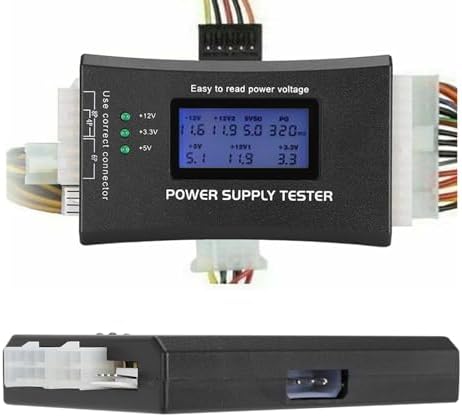
- 【Scope of Application】LCD power supply tester is compatible with P4/P6/P8/IDE, and is externally compatible with DIE/P6/...
- 【Fast Test】This PC power supply tester simply connects to the connector of the power supply to easily visualise whether ...
- 【LCD Display】Computer power supply tester has LCD intuitive display voltage (+/-0.01V), automatic fault alarm, complete ...
Memory and Storage Benchmarking Techniques
When it comes to understanding the performance of your custom-built PC, memory and storage benchmarks play a crucial role. These benchmarks provide insight into the capabilities of your RAM and storage drives, including solid-state drives (SSDs) and hard disk drives (HDDs). By employing the right benchmarking techniques, users can effectively assess their system’s performance and identify potential areas for improvement.
The first step in benchmarking memory involves evaluating the speed of your RAM. Tools such as MemTest86 allow users to perform stress tests and gauge the stability and speed of the memory modules. Key metrics to focus on include memory frequency, latency, and overall throughput. Frequent benchmarking of your RAM ensures that it operates correctly and under optimal conditions, ultimately enhancing the system's performance.
Storage benchmarking is equally essential, particularly when comparing SSDs and HDDs. The read and write speeds of these drives significantly affect loading times and overall system responsiveness. Utilizing tools like CrystalDiskMark or AS SSD Benchmark enables users to measure sequential and random read/write speeds. SSDs, known for their superior performance, should ideally exhibit high speeds in both metrics; in contrast, HDDs typically fall short in random access speeds but can still perform admirably in sequential tasks.
Selecting the appropriate benchmarking tools is vital for accurate assessments. Ensure that the software is compatible with your system and reports detailed results. These tools often provide information on both synthetic and real-world performance, giving a well-rounded view of how your memory and storage components behave under varied conditions.
Understanding these parameters and employing comprehensive benchmarking techniques will not only help in achieving peak hardware performance but also contribute to a more efficient and responsive computing experience. Regular monitoring can guide you in upgrading or optimizing your memory and storage configurations as technology evolves.
Analyzing Benchmarking Results
Once you have conducted your benchmarking tests, the next critical phase involves analyzing the results. Proper interpretation is essential to understand how your custom-built PC performs in relation to industry standards. Start by collecting data from various benchmarking tools you have utilized, ensuring you have a comprehensive outlook on your system's capabilities.
The first step in analysis is to compare your benchmark results against widely accepted industry standards. These benchmarks represent an established baseline of performance for similar hardware configurations. Use reputable sources and databases to discover average performance figures for components such as CPUs, GPUs, and RAM. By referencing these benchmarks, you can assess whether your system meets, exceeds, or falls short of the expected performance metrics.
Next, it is vital to comprehend what constitutes 'normal' performance for your specific hardware setup. Performance can significantly vary depending on numerous factors, including thermal conditions, power supply quality, and even BIOS configurations. Keep in mind that minor fluctuations between different benchmarking tests are typical. This variance often stems from the unique workload each test imposes on the hardware.
Furthermore, understanding the reasons behind any performance disparities is essential. For instance, if a benchmark reveals that your CPU performs below expectations, consider aspects such as overclocking settings, cooling solutions, or bottlenecks caused by components such as the hard drive. Investigating these elements can facilitate optimizing your setup for improved performance.
By methodically comparing your results to industry benchmarks and interpreting deviations, you can gain valuable insights into your PC's operational health. This analytical approach allows you to make informed decisions about potential upgrades or adjustments to enhance overall performance.

- PCI ISA INTERFACE: This PC diagnostic card adopts standard PCI and ISA interface, easy access to desktop PC.
- 4 DIGIT DISPLAY: This PC mother board adopts 4 digit display, the first 2 digits indicate the current error code, and th...
- STRONG COMPATIBILITY: This PC diagnostic 4 digit card is compatible with ny kind motherboards with the PCI and ISA bus s...
Troubleshooting Performance Issues
After completing the benchmarking of your custom-built PC, it is crucial to analyze the results thoroughly to identify any potential performance issues. Many common problems can arise, and recognizing these challenges is the first step toward optimizing your system's performance. Here are several strategies to address the most frequent issues flagged during benchmarking.
One of the primary areas to investigate is resource usage. High CPU temperatures or excessive utilization can signify inadequate cooling solutions or potential hardware bottlenecks. If your benchmarking results reveal that the CPU is consistently operating near its maximum capacity, it might be beneficial to revisit your cooling system. Ensure that all fans are functioning efficiently, clean out dust from heatsinks, and, if necessary, upgrade to a more robust cooling solution.
Memory performance issues can also surface during benchmarking tests, identified through tardy response times or high latency figures. If your RAM is underperforming, verify that it is properly seated on the motherboard and running at the correct speeds. Also, check in your system BIOS or use a utility to ascertain that the memory speed is set to the desired level, often achieved through enabling XMP profiles, which could significantly boost overall system performance.
Furthermore, storage device performance can heavily influence the results obtained from benchmarking software. A sluggish hard drive or even suboptimal SSD reads/writes can drastically affect load times and system responsiveness. Regularly defragmenting traditional hard drives or utilizing tools to optimize SSD performance, like TRIM, can alleviate some of these issues. If high read/write times continue to manifest, consider upgrading to a faster storage solution or ensuring that the current one is not nearing full capacity.
By systematically addressing these common performance issues based on your benchmarking analysis, you can harness the full potential of your custom build, ensuring it runs smoothly and efficiently.
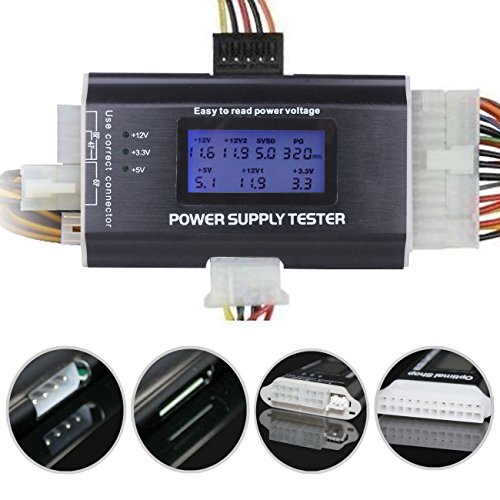
- This power supply tester is the ultimate tool for all computer repair people. It comes with an 8-in-1 ATX power supply t...
- Aluminum alloy material.ATX POWER Power Tester (LED screen Blu-ray version).ATX POWER dedicated power supply tester POWE...
- This is new power supplies go, this tester is up to the task because it can test 8 pin cpu, pci express, and sata. Featu...
Conclusion and Tips for Future Benchmarking
Benchmarking your custom-built PC is an essential procedure that not only assesses the system's performance but also informs users about potential areas of improvement. By conducting a thorough benchmarking process, users can identify bottlenecks, ensure all components work cohesively, and make informed decisions about upgrades. This practice serves as a crucial indicator of how well the system performs under various conditions, providing insights that can enhance the overall user experience.
To fully benefit from benchmarking, it is advisable to make this practice a regular part of your maintenance routine. Performing periodic benchmarks allows you to track performance trends over time, ensuring your system remains optimized. This can be particularly useful after significant hardware upgrades, software installations, or changes to system settings. Consistent benchmarking can reveal hidden issues that may affect performance and help maintain an efficient computing environment.
Additionally, staying updated on the latest benchmarking tools and software is crucial. The field of benchmarking is ever-evolving, with new tools emerging that may provide more precise and comprehensive analyses. By utilizing the most current tools, you can ensure your assessments are accurate and reflective of your contemporaneous performance requirements. When testing your PC, keep an eye on the specific metrics that matter most to you, such as CPU and GPU performance, thermal outputs, and overall system stability.
In conclusion, a disciplined approach to benchmarking not only optimizes your PC's performance but also fosters a deeper understanding of your system's capabilities. By committing to regular evaluations and leveraging modern benchmarking solutions, you enhance your knowledge and maintain the robustness of your custom build.

0 Comments