Introduction to Thunderbolt 5 Docks
Thunderbolt technology has significantly evolved since its inception, and the latest iteration, Thunderbolt 5, marks a substantial leap forward in terms of speed, connectivity, and overall functionality. This new standard is poised to redefine how users interact with their devices, particularly within workstation setups that demand high performance and versatility.
Thunderbolt 5 boasts remarkable advancements, including support for data transfer speeds of up to 80 Gbps, which is double the throughput of its predecessor, Thunderbolt 4. This increase allows for a far more efficient transfer of large files, making it an ideal choice for professionals who work with high-resolution video, complex 3D modeling, or extensive data analysis. The enhanced bandwidth ensures smooth operation across multiple peripherals, eliminating lag and allowing for seamless multitasking.


Moreover, Thunderbolt 5 incorporates improved connectivity options; it can support multiple monitors with high resolutions, such as 8K displays, which is vital for graphic designers, video editors, and other workstation users. Additionally, it maintains backward compatibility with previous Thunderbolt versions, making it easier for users to upgrade their setups without sacrificing existing peripherals.
Power delivery is another key feature of Thunderbolt 5 docks, which can provide up to 240 watts of power. This capability not only enables charging of laptops and devices but also facilitates the operation of additional connected hardware. Users can power an extensive setup through a single cable, greatly reducing cable clutter and simplifying workstation organization.
Thunderbolt 5 docks are essential for maximizing productivity in a modern office or home workspace. By leveraging the advancements of this technology, users can create a more efficient, powerful, and streamlined workstation tailored to their specific professional needs.
Key Features of Thunderbolt 5 Docks
Thunderbolt 5 docks represent a significant advancement in connectivity technology, significantly outpacing previous generations. One of the standout features of Thunderbolt 5 docks is their impressive bandwidth capability, which can reach up to 80 Gbps. This allows users to transfer large files and stream high-resolution media seamlessly, making it an ideal choice for professionals engaged in video editing, graphic design, or any resource-intensive tasks that demand rapid data transfer.
In addition to bandwidth, the variety of ports available on Thunderbolt 5 docks is another critical feature. These docks typically include a mix of USB-A, USB-C, HDMI, and DisplayPort interfaces, allowing for extensive compatibility with various peripherals. This variety enables users to connect multiple devices, such as monitors, printers, and external storage, all through a single docking station. The inclusion of USB4 support also enhances connectivity, ensuring that users can leverage the most recent advancements in peripheral technology.
Daisy-chaining capability is yet another significant element that sets Thunderbolt 5 docks apart. This feature permits users to connect multiple Thunderbolt devices in series, which can simplify desktop setups and reduce cable clutter. Users can easily add additional monitors and storage devices without the hassle of managing numerous connections. Furthermore, Thunderbolt 5 docks offer enhanced power delivery specifications, providing up to 100W of power to connected laptops or devices. This ensures that users can charge their devices even while simultaneously using them for demanding applications.
Advantages of Using a Thunderbolt 5 Dock for Triple Monitor Setups
Utilizing a Thunderbolt 5 dock is a game-changer for professionals seeking to establish an efficient triple monitor setup. One of the most significant advantages is the capability to support high-resolution displays seamlessly. Thunderbolt 5 technology offers unparalleled data transfer speeds, reaching up to 40 Gbps, which is crucial when streaming video content or handling graphic-intensive applications across multiple monitors. This ensures that users can enjoy sharp visuals and maintain optimal performance without lag, making it ideal for graphic designers, video editors, and anyone who relies on high-resolution output.
Another notable benefit of employing a Thunderbolt 5 dock is the simplification it brings to connectivity. Traditionally, users needed multiple cables for each monitor, creating an untidy and convoluted workspace. However, with a Thunderbolt 5 dock, a single cable connection can interface with all three monitors. This reduction in cable clutter not only enhances the aesthetic appeal of the workstation but also minimizes the hassle involved in setup and teardown. Furthermore, it creates an organized workspace that can lead to increased focus and efficiency.
Additionally, a Thunderbolt 5 dock enhances overall productivity by allowing users to run multiple applications simultaneously across various displays. This multitasking capability is especially beneficial in today’s fast-paced work environments, enabling users to drag and drop files effortlessly from one screen to another. With the capacity to view multiple programs at once, professionals can streamline their workflows, manage complex tasks more efficiently, and ultimately achieve better results. Overall, the advantages of using a Thunderbolt 5 dock for triple monitor setups are multifaceted, transforming how individuals engage with their computing environments.
Top Thunderbolt 5 Docks on the Market
The evolving technological landscape has led to the emergence of Thunderbolt 5 docks that cater to enhanced connectivity and performance needs. Below are some of the top Thunderbolt 5 docks available, recognized for their specifications and unique features.
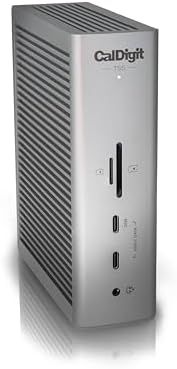
1. CalDigit TS4 Thunderbolt 5 Dock: This dock offers a variety of ports, including USB-A, USB-C, HDMI, and Ethernet, while supporting dual 4K displays. Its sleek design makes it suitable for professional environments, and it provides up to 98W of power delivery. Pricing typically ranges around $349, making it a premium choice for users needing extensive connectivity.
2. OWC Thunderbolt 5 Dock: OWC’s offering features 14 ports, including an SD card reader, USB-C ports, and a DisplayPort for monitors. With a maximum power output of 85W, it’s an excellent choice for those who want to connect multiple devices simultaneously. Priced at approximately $299, it is competitively positioned in the market.
3. Anker 563 Thunderbolt 5 Dock: Known for its portability, the Anker dock includes multiple USB ports, HDMI outputs, and a Gigabit Ethernet port. Its power delivery supports up to 90W, making it very efficient for colleagues on the go. Priced around $249, it offers great value for devices requiring robust connectivity.
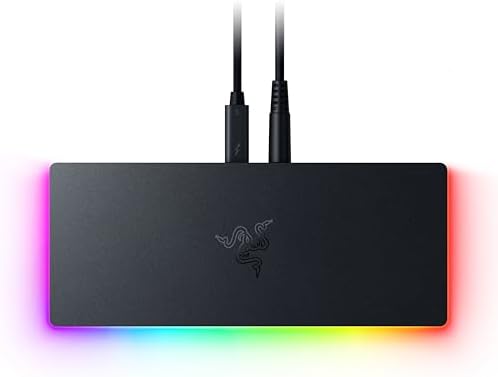
4. Razer Thunderbolt 5 Dock Chroma: This dock is not only functional but stylish, as it comes with RGB lighting for gaming aesthetics. It supports 4K output to dual monitors and includes necessary USB connections. At a price point of about $349, its emphasis on design and performance targets gamers and creative professionals alike.
Each of these Thunderbolt 5 docks has its set of features and capabilities, allowing users to select one that best meets their specific needs. Whether for work, creative projects, or gaming, these docking solutions present superior connectivity options with notable power delivery.
Comparative Analysis of Thunderbolt 5 Docks
In the rapidly evolving technology landscape, choosing the right Thunderbolt 5 dock can significantly enhance your computing experience, particularly for those managing complex multi-monitor workstations. This comparative analysis focuses on several leading Thunderbolt 5 docks, examining their features, advantages, and potential drawbacks across various use cases including gaming, professional work, and creative tasks.
One noteworthy option is the CalDigit Thunderbolt 5 Dock. It boasts impressive connectivity options, offering multiple USB-A ports, HDMI outputs, and an Ethernet port. The versatility of this dock makes it well-suited for professionals who require extensive peripheral connections for high productivity. However, some users may find its price point slightly steep given its premium features.
Another strong contender is the OWC Thunderbolt 5 Hub. This model excels with its compact design and robust performance, making it perfect for mobile professionals. It supports high-speed data transfer and has excellent display capabilities, providing an optimal setup for presenting work to clients. The primary disadvantage lies in the limited number of ports available compared to other models, which could be a hindrance for power users.
For gamers, the Akitio Thunderbolt 5 Dock stands out due to its high bandwidth, capable of supporting demanding applications. With its gaming-centric features such as lower latency and faster response times, it significantly enhances gaming experiences. However, this dock may lack some of the features required by those who utilize multiple peripherals or external storage solutions, thus narrowing its audience.
This analysis illustrates that the ideal Thunderbolt 5 dock can vary based on individual needs. Whether focused on speed, connectivity, or a combination of both, users can find a dock that aligns closely with their specific applications, optimizing their working environment for efficiency and performance.
Setting Up Your Thunderbolt 5 Dock
Setting up a Thunderbolt 5 dock involves several crucial steps, beginning with unboxing and ending with the full configuration of your workstation. First, carefully remove the dock from its packaging, ensuring to keep all components intact. Inside the box, you should typically find the Thunderbolt 5 dock itself, an appropriate power adapter, a Thunderbolt 5 cable, and any necessary documentation for installation.
Next, place the dock in a convenient location on your desk, ideally near your computer and power outlet. Connect the dock to the power source using the provided adapter. This step is essential as it allows your dock to deliver the necessary power and high-speed data transfer for multiple devices.
Once the power connection is established, utilize the Thunderbolt 5 cable to connect the dock to your computer. This connection will enable the dock to communicate with the machine, allowing you to extend or mirror displays across three monitors seamlessly. Follow the manufacturer's guidelines for connecting additional peripherals such as keyboards, mice, and external storage devices.
After physically setting up the hardware, install any required drivers or software that may be necessary for optimal performance. These drivers are typically available on the manufacturer’s website. Make sure to check for updates, as having the latest drivers can significantly enhance compatibility with your devices.
In the event that you encounter issues during setup, troubleshooting is often straightforward. First, verify that all connections are secure and that the dock is receiving power. If your devices are not recognized, try connecting them to different ports on the dock. Always ensure the Thunderbolt 5 cable is in good condition and properly connected both to the dock and your computer. Following these steps should provide a clear path to a fully functioning Thunderbolt 5 workstation.
User Experiences with Thunderbolt 5 Docks
In recent reviews and user experiences regarding Thunderbolt 5 docks, a common theme emerges: users appreciate the enhanced performance and versatility these devices bring to their workstations. Many users have praised the connectivity stability of Thunderbolt 5 docks, expressing satisfaction with how seamlessly they integrate into multi-monitor setups. Reports indicate that once connected, the docks maintain robust connections, facilitating smooth transitions between devices without frequent disconnections, which is particularly crucial in fast-paced work environments.
Moreover, the data transfer speeds provided by Thunderbolt 5 technology have left users impressed. Many reviews highlight the ability to transfer large files — such as high-resolution videos and extensive databases — in minimal time compared to previous iterations of Thunderbolt docks. This is especially beneficial for professionals in fields such as video editing, graphic design, and data analysis, where time efficiency can significantly impact productivity. Users have also noted that the bandwidth capabilities of Thunderbolt 5 enable them to run multiple devices simultaneously at high performance, which enhances overall work efficiency.
Overall satisfaction ratings for Thunderbolt 5 docks tend to be high, with many users feeling that their investment was justified. The feedback often reflects a combination of factors, including ease of installation, build quality, and performance reliability. Occasional critiques regarding the price point exist, but users frequently counter that the technology's performance outweighs these concerns. By consolidating video output, data transfer, and charging into a single cable, Thunderbolt 5 docks allow for streamlined workspaces that contribute positively to user experiences across the board.
Future of Thunderbolt Technology in Workstations
The advancement of Thunderbolt technology is poised to revolutionize workstation setups, paving the way for increased efficiency and integration in a wide array of professional fields. As technologies evolve, we can anticipate several key trends that will shape the future of Thunderbolt-enabled workstations.
One significant development is the expected enhancement in data transfer speeds and bandwidth. Thunderbolt 5 is projected to deliver speeds upwards of 80 Gbps, significantly surpassing its predecessors. This increase will facilitate smoother operation of high-resolution displays, making triple-monitor setups even more practical for creative professionals who rely on expansive real estate for multitasking. With such capabilities, designers, engineers, and data analysts are likely to see a marked improvement in their workflow, as they will be able to manage more demanding applications without compromising performance.
Moreover, the integration of USB4 compatibility with Thunderbolt technology will likely solidify its position as a universal connectivity standard. This broadening of compatibility will not only simplify the user experience but also foster a more streamlined ecosystem where devices from various manufacturers can interoperate seamlessly. As more devices adopt this standard, workstations will become increasingly modular, allowing users to customize setups to better suit their specific needs.
In addition, energy efficiency and power delivery capabilities are expected to advance, allowing users to power multiple devices from a single Thunderbolt connection. This feature will not only reduce cable clutter but also enhance workstation mobility, catering to the growing trend of remote and flexible work environments. As companies and individuals continue to seek out solutions that improve workspace productivity, the evolving Thunderbolt technology will play a crucial role in shaping the future of workstations.
Conclusion: Choosing the Right Thunderbolt 5 Dock
Choosing the appropriate Thunderbolt 5 dock is critical for maximizing productivity in a triple-monitor workstation. With a variety of options available on the market, understanding your specific requirements is essential in making an informed decision. Firstly, consider the compatibility of your devices with Thunderbolt 5 technology. Ensuring your laptop or computer supports Thunderbolt 5 will allow you to fully utilize the dock’s capabilities.
Next, evaluate the number and type of ports offered by the dock. Different users have varying needs regarding connectivity. For instance, if you require multiple USB devices, a dock with ample USB ports is necessary. Furthermore, if you plan to connect external displays, checking for the presence of DisplayPort or HDMI outputs is vital. The dock must accommodate the specifications of your monitors, particularly in terms of resolution and refresh rates.
Power delivery is another significant factor to consider. A Thunderbolt 5 dock that supports high wattage power delivery can charge your laptop while simultaneously providing data transfer and video output. This feature is particularly useful for mobile professionals who desire a clutter-free workspace.
Lastly, consider additional features that may enhance your workstation experience. Features like built-in SD card slots, Ethernet ports for wired connections, and audio jacks can add great value to your setup. Reading reviews and comparing products based on your unique needs will lead to a satisfactory purchase.
By carefully assessing these aspects, you can select a Thunderbolt 5 dock that will seamlessly integrate into your triple-monitor workstation, boosting efficiency and workflow.



0 Comments