Introduction to Headphone Distortion
Headphone distortion refers to the deterioration of audio quality and clarity during playback, which is often noticeable in various listening environments. Common symptoms of this phenomenon include lack of clarity, muffled sounds, and unwanted crackling noises that significantly detract from the overall listening experience. Users may frequently notice these distortions when listening to music, podcasts, or during calls, especially at higher volumes or with bass-heavy tracks.
The impact of distortion is particularly pronounced in genres such as rock, hip-hop, or electronic music, where intricate sound layers and heavy bass lines rely on a clear and precise audio performance. When headphones distort sound, the listener may find it challenging to appreciate the nuances of their favorite tracks or even struggle to understand spoken dialogue in audio content.

- All-Day Comfort & Premium Design: Crafted with high-quality materials, these over-ear wireless headphones combine luxury...
- Unbeatable 60-Hour Battery Life: Enjoy up to 60 hours of playtime in standard mode at moderate volume. A quick 5-minute ...
- Bluetooth 6.0 & Seamless Connectivity: Advanced Bluetooth 6.0 ensures stable, high-speed pairing with smartphones, table...
For many audiophiles and casual listeners alike, sound quality is paramount. A good set of headphones should deliver a balanced audio experience, allowing users to fully engage with their content. When distortion occurs, it not only affects enjoyment but can also lead to frustration. Understanding the reasons behind headphone distortion is essential, as many issues can often be resolved with simple troubleshooting methods.
Moreover, the intent to fix distortion can help users enhance their listening experience significantly. Recognizing the signs of distortion and being aware of its common causes can empower users to take action. In the following sections, we will explore practical strategies to identify and resolve headphone distortion, ensuring that users can reclaim high-fidelity sound quality and enjoy their audio content to the fullest.
Understanding the Causes of Distortion
Headphone distortion is a common issue faced by users, arising from a variety of factors that can affect sound quality. One primary cause is the quality of the source audio itself. Low-bitrate MP3 files and poorly mixed tracks can lead to distortion, regardless of headphone quality. Therefore, it is crucial to utilize high-resolution audio files to ensure optimal sound performance.
Another significant contributor to audio distortion is device compatibility. Headphones may not perform well with certain devices, especially when there is an impedance mismatch. Typically, high-impedance headphones require more power to deliver optimal sound. If used with low-power devices, such as smartphones or tablets, users may experience reduced audio quality, including distortion.
Physical damage to headphones is yet another factor that can lead to distorted sound. Issues such as frayed cables, damaged drivers, or wear and tear on ear pads can compromise sound reproduction. Regular inspection of headphones is advised to catch any damage early and ensure their longevity.
Poor connections can also result in audio distortion. Loose connections, whether at the headphone jack or within a cable, can lead to intermittent audio and unwanted noise. Ensuring that connections are tight and without corrosion can prevent this issue. Furthermore, incorrect settings on audio devices may contribute to distortion. Equalization settings that are poorly adjusted can result in overly boosted frequencies, which can overwhelm the headphone drivers, leading to distorted output.
Lastly, the type of headphones plays a crucial role in sound quality. Over-ear headphones typically provide better sound isolation and balanced audio, while in-ear models may emphasize different frequencies. The design, including the driver size and diaphragm materials, directly impacts how sound is produced and can lead to distortion if not suited to the audio source.
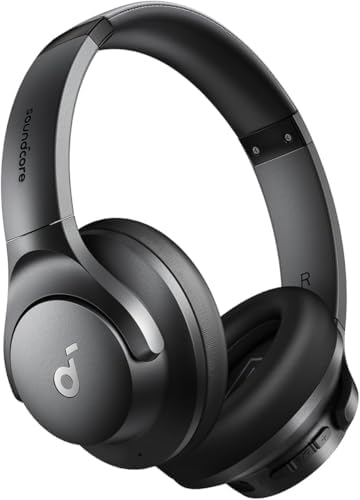
- Hybrid Active Noise Cancelling: 2 internal and 2 external mics work in tandem to detect external noise and effectively r...
- Immerse Yourself in Detailed Audio: The noise cancelling headphones have oversized 40mm dynamic drivers that produce det...
- 40-Hour Long Battery Life and Fast Charging: With 40 hours of battery life with ANC on and 60 hours in normal mode, you ...
Checking Your Audio Source
When experiencing sound distortion through your headphones, one of the first areas to investigate is the audio source itself. The nature of the audio file or stream being played can significantly impact the clarity and quality of sound. Low-quality audio files, such as those compressed in formats that sacrifice bit rate for smaller size, can lead to various distorting effects. For instance, audio files with a sample rate lower than 192 kbps may exhibit a lack of detail and produce unwanted artifacts in sound, generating a distorted listening experience.
Additionally, streaming services often offer different quality settings that can affect playback. Users may inadvertently select a lower bitrate setting to save data usage, which can compromise audio fidelity. It is essential to check the settings of your preferred media player or streaming service to ensure that they are configured to provide the best audio quality available. Many platforms offer options such as high-quality streaming to ensure that better sound fidelity is consistent, contributing to a more enjoyable listening experience.
Another factor to consider is the compatibility and settings of your media player. Certain media players allow you to adjust the output format and frequency. Settings that are not properly adjusted based on your audio equipment specifications can easily result in distorted sound. Grasping these details and making necessary adjustments, such as changing the output format or optimizing equalizer settings, can substantially enhance audio quality.
In summary, examining your audio source for potential quality issues is crucial in diagnosing sound distortion. By scrutinizing file quality, streaming settings, and media player configurations, you can often resolve these problems and restore the intended sound clarity to your headphones.
Inspecting the Headphones for Damage
When experiencing distortion in your headphones, it is essential to start by examining them for any physical damage. Over time, regular usage can lead to wear and tear that may significantly affect sound quality. Common issues include frayed wires, damaged connectors, and faulty speakers, all of which can contribute to the unwanted distortion that hampers the listening experience.
Frayed or broken wires are often the first culprits in declining audio performance. If the wires are exposed or damaged, they can interrupt the signal transmitted from the audio source to the speakers, leading to distorted sound. It is advisable to check the entire length of the cable, paying close attention to stress points, such as where the cable meets the plug and ear cups. Any signs of wear should prompt further inspection or, if necessary, replacement.
The connectors that plug into devices can also become faulty, often due to corrosion or physical damage. Ensure that the connectors are clean and free from debris. A damaged connector may not make a secure connection, resulting in intermittent sound or distortion. Regular maintenance checks at this juncture are vital. Users should clean connectors periodically with a dry cloth or use contact cleaner designed for electrical components.
Finally, the speakers themselves can deteriorate over time. Moisture, dust, or general wear can affect speaker performance and lead to distortion. Checking for any visible tears, dents, or dust accumulation will provide insights into their condition. If the speakers are compromised, professional repair or replacement should be considered.
In summary, regularly inspecting your headphones for damage plays a crucial role in ensuring they deliver optimal sound quality. By identifying issues early, users can prevent distortion and prolong the lifespan of their headphones.

- INTRODUCING THE SONY WH-CH520: Enjoy superb sound for every song, in a style that suits you, Featuring our Digital Sound...
- HIGH-QUALITY SOUND, TAILORED TO YOU: These Sony headphones feature DSEE technology to upscale every track, 360 Reality A...
- LISTEN IN COMFORT AND STYLE: With soft earpads and weighing just 147g, these wireless headphones are comfortable, Choose...
Adjusting Device Settings
To address any distortion issues that may arise from your headphones, it is essential to start by checking and adjusting the settings on the device you are using. Various factors, such as equalizer (EQ) settings, volume levels, and audio enhancements, can significantly influence the sound output.
Firstly, explore the equalizer settings on your device. Many devices allow users to customize EQ settings to suit different audio profiles, from bass-heavy sounds to more balanced acoustics. If your headphones are sounding distorted, consider resetting the EQ to a neutral setting or reverting to the manufacturer's default preferences. This reset can help eliminate any unconventional audio adjustments that may not be compatible with your headphones.
Next, examine the overall volume levels. Playing audio at excessively high volume can lead to distortion, making it crucial to keep the volume at a sensible level. Ensure that volume sliders are set to a moderate range both on your device and in any applications you are using. Additionally, be cautious of independent volume controls on your headphones, if available.
Furthermore, many modern devices come equipped with various audio enhancements and sound effects designed to enrich the listening experience. However, these features may not always complement every type of headphone. Options such as surround sound simulations or virtual sound enhancements can sometimes be counterproductive. If your headphones have a high fidelity design, deactivate these enhancements to allow for a cleaner sound output that stays true to audio quality.
By systematically assessing these settings, it becomes possible to uncover and rectify any distortions experienced while using your headphones. Taking the time to properly adjust your device settings is a pivotal step in enhancing audio quality and ensuring an enjoyable listening experience.
Testing with Other Devices
When encountering sound distortion in headphones, an important step in troubleshooting is testing the headphones with different audio devices. This method can help determine whether the issue originates from the headphones themselves or the original source. By connecting your headphones to various devices, such as another phone, computer, or audio player, you can effectively isolate the problem.
To conduct the test, begin by disconnecting your headphones from the current device. Then, connect them to another device that you know functions properly. This could be a smartphone, tablet, or even a home stereo system. Make sure to play audio content that you previously identified as distorted on the original device. If the sound quality improves and the distortion disappears, it indicates that the issue may lie with the original device rather than the headphones.
On the other hand, if the distortion persists even when connected to an alternate audio source, it points towards a potential fault with the headphones. Factors such as damaged drivers, frayed wires, or loose connections can severely impact sound quality, making testing with various devices essential for accurate diagnosis.
Furthermore, consider testing the headphones with devices of differing specifications. For instance, try using a high-fidelity audio source if available, as this might reveal issues that lower-quality devices mask. By broadly assessing the functionality across diverse device contexts, users can better understand the underlying cause of the distortion.
In summary, testing your headphones with multiple devices can provide clarity on whether the sound distortion originates from the headphones themselves or the initial audio source, enabling you to take appropriate remedial actions.

- INTRODUCING THE SONY WH-CH520: Enjoy superb sound for every song, in a style that suits you, Featuring our Digital Sound...
- HIGH-QUALITY SOUND, TAILORED TO YOU: These Sony headphones feature DSEE technology to upscale every track, 360 Reality A...
- LISTEN IN COMFORT AND STYLE: With soft earpads and weighing just 147g, these wireless headphones are comfortable, Choose...
Using an Audio Interface or DAC
An audio interface or digital-to-analog converter (DAC) serves as a critical component in audio reproduction, converting digital signals from a computer or digital source into analog signals that headphones can interpret. These devices streamline the audio output process, often enhancing sound quality significantly. By improving the fidelity of the audio signal, an audio interface or DAC can reduce distortion, providing a cleaner, more accurate listening experience.
One of the primary benefits of utilizing an external DAC is its ability to better manage the dynamic range and detail in audio playback. Many built-in sound cards in computers or mobile devices may not capture the full range of audio frequencies, leading to a subpar listening experience characterized by distortion, especially at higher volumes. For instance, when listening to high-resolution audio files, an external DAC allows for more detail and clarity, ensuring that the listener receives the highest quality sound.
Moreover, specific situations can greatly benefit from an external audio interface. For music production, where accurate sound reproduction is crucial, a high-quality DAC can minimize audio latency and distortion, allowing musicians and producers to monitor their work more effectively. Gamers may also experience enhanced immersion in sound when using an audio interface, as precise audio cues can significantly impact gameplay experience. In scenarios involving critical listening or audio analysis, the accuracy provided by a dedicated DAC can help identify nuances that might otherwise go unnoticed.
In summary, using an audio interface or DAC not only elevates the sound quality of your headphones but also contributes to a more enjoyable and precise auditory experience across various applications, from music production to gaming and casual listening.

- High-Resolution Sound Quality by Professional Audio Team - Our custom-made aluminum fascia and 50mm neodymium drivers pr...
- Dual Mode and Never Power Off - In wireless mode, you'll enjoy up to 110 hours of playtime on a single charge. And in wi...
- Maximum Comfort and Space-Saving Design - The over-ear, ergonomic design ensures long-lasting comfort, with a multi-angl...
Cleaning and Maintaining Your Headphones
Headphones are an integral part of our daily lives, offering the ability to immerse ourselves in music, podcasts, and other audio experiences. However, over time, headphones can accumulate dirt, debris, and sweat, leading to distorted sound quality. It is essential to implement a regular cleaning and maintenance routine to preserve headphone functionality and enhance audio performance.
To clean your headphones effectively, start by examining the ear cups and cushions. Use a soft, dry cloth to gently wipe down the exterior surfaces. For more thorough cleaning, especially on rubberized components, a slightly damp cloth can be used; however, ensure that no moisture enters the speakers. For removable ear pads, detach them carefully and clean them separately according to manufacturer instructions, which often recommend using mild soap and water.
Pay special attention to the area around the headphone jack and any input/output ports. These areas can trap lint and dust, leading to connectivity issues and sound distortion. Utilize compressed air or a soft brush to remove any buildup in these gaps, ensuring that your headphones maintain optimal performance.
Proper storage is equally important for headphone maintenance. When not in use, store headphones in a protective case or pouch to shield them from physical damage and exposure to dust. Avoid wrapping the cords tightly around the headphones as this can create kinks and damage the wires over time. Instead, use a loose coil or a designated cable organizer to maintain the integrity of the audio cables.
Incorporating these simple cleaning techniques and storage practices into your routine can significantly extend the lifespan of your headphones, reducing the likelihood of distortion caused by accumulated dirt or sweat. Regular attention to maintenance will ensure that you continue to enjoy a clear and vibrant audio experience.

- HIGH FIDELITY STEREO HEADPHONES: KVIDIO upgraded bluetooth headphones with dual 40mm drivers and noise isolation technol...
- UNMATCHED COMFORTABLE HEADPHONES: Over ear earmuff made by softest memory-protein foam gives you all day comfort. Adjust...
- WIDE COMPATIBILITY: Simply press multi-function button 2s and the over ear headphones with mic will be in ready to pair....
Conclusion and Final Thoughts
In conclusion, headphone distortion can lead to a frustrating listening experience, often detracting from the overall enjoyment of music or other audio content. Several factors can contribute to this issue, such as poor connectivity, incorrect equalizer settings, or damaged drivers. Throughout this article, we have discussed various methods to troubleshoot and remedy this problem. These include checking for loose connections, adjusting audio settings, keeping headphones clean, and updating audio software.
As the listening experience highly depends on the quality of sound delivered by headphones, identifying the source of the distortion is crucial. For many, resolving issues such as limited frequency response or interference with other devices can significantly improve sound quality. Furthermore, the importance of regular maintenance and timely software updates cannot be overlooked, as these practices help enhance performance over time.
While some distortion may be a sign of wear and tear or defective components, users should experiment with the provided solutions before considering replacement. It is important to approach each potential issue methodically to determine the most effective fix. In instances where self-troubleshooting proves ineffective, seeking professional help might be the best course of action to ensure a proper assessment and resolution.
Ultimately, understanding the mechanics behind headphone distortion empowers users to take control of their listening experience. By implementing these strategies, individuals can enhance their audio enjoyment and potentially extend the lifespan of their headphones. Remember, a little patience and experimentation can go a long way in restoring sound quality.

0 Comments