Introduction to Game Lighting
The integration of room lighting with gameplay is an innovative approach that significantly enhances the gaming experience. This concept revolves around syncing ambient lighting with the visual cues of the game, creating a seamless interplay between the virtual and physical environments. The significance of this synchronization cannot be understated, as it serves to deepen immersion, enabling gamers to feel as though they are truly part of the digital world.
Proper lighting is crucial in various forms of media, and gaming is no exception. The psychological effects of lighting can profoundly influence a player’s mood and engagement level. For instance, darker environments can create tension and excitement during thrilling moments, while brighter, softer lighting can evoke feelings of safety in calmer gameplay sections. By aligning the room’s illumination with the on-screen action, players can react more instinctively to game dynamics, as their senses become attuned to the changes in both the game and their surroundings.

- 【Reversible L Shape Desk】This L shaped gaming desk comes with storage shelves, drawers, grid pegboard, power outlet, lig...
- 【Power Outlets & Charging Ports】 Computer desk is equipped with 2 power outlets & 2 USB charging ports for your electron...
- 【Gaming Desk with LED Lights】:This gaming desk with shelves features built-in LED lighting in 10 colors, 10 lighting mod...
Furthermore, studies in environmental psychology reveal that lighting not only affects visibility but can also enhance performance. Players exposed to dynamic lighting conditions that sync with their in-game activities may find themselves more alert and responsive. Such an adaptive lighting system can serve as an additional layer of feedback, allowing gamers to experience gameplay in a multidimensional manner. As the modern gaming landscape continues to evolve, the impact of such innovations cannot be ignored, paving the way for more immersive and aesthetically engaging interactions.
Essential Equipment for Syncing Lighting
To successfully synchronize your room's lighting with gameplay, specific equipment is necessary to create an immersive experience. The primary components include smart bulbs, lighting strips, and compatible software.
Smart bulbs are the cornerstone of this setup. They allow users to adjust the brightness and color according to the action on the screen. Popular options include Philips Hue, which offers a wide range of colors and is compatible with various smart home platforms. Another viable option is LIFX bulbs, known for their bright illumination and no need for a hub, allowing for a more straightforward installation. Both brands provide an intuitive application for easy control.
Next, LED lighting strips can enhance your gaming environment further. These strips can be placed around your monitor or gaming setup to cast ambient light that reacts to the gameplay. A recommended choice is the Govee LED Light Strip, which includes a music sync feature and is controllable via a smartphone app. The easy installation and customizable length of these strips make them ideal for beginners.
In addition to hardware, having the right software is crucial to achieving synchronization. Programs like Razer Synapse and Corsair iCUE support various lighting devices and can link your lights to in-game actions, creating a cohesive gaming atmosphere. Many smart bulb brands also have their apps, enabling seamless integration with your game settings.
To summarize, incorporating smart bulbs, LED lighting strips, and compatible software is essential for syncing your room's lighting with gameplay. Brands like Philips Hue, LIFX, and Govee offer excellent entry points for beginners, ensuring a smooth and engaging experience.
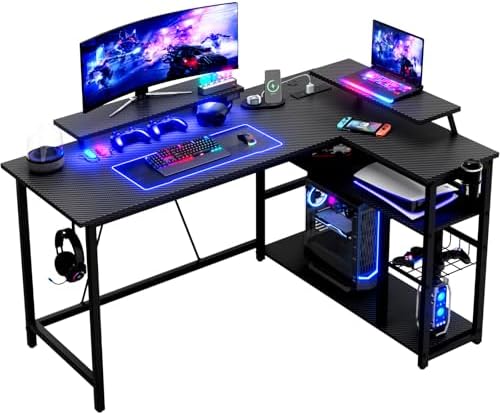
- Carbon Fibre Gaming Corner Desk: The RGB light strip beneath the monitor stand is a key highlight — with 7 colours and 2...
- Convenient Charging Design: This L-shaped desk comes with 2 power sockets, plus 1 USB port and 1 Type-C port, making it ...
- Spacious Storage: This desk has dimensions of 140cm (L) x 80cm (W) x 75cm (H), offering ample storage space. Its roomy d...
Understanding RGB Lighting Basics
RGB lighting, an abbreviation for Red, Green, and Blue, forms the foundation of creating a vibrant visual atmosphere within gaming environments. This color model utilizes varying intensities of red, green, and blue light to produce a diverse spectrum of colors. By mixing these three colors in specific proportions, millions of different hues can be generated, making RGB lighting highly versatile and customizable.
In gaming, RGB lighting is not merely for aesthetic enhancement; it plays a significant role in immersion. Users can experience dynamic lighting effects that synchronize with gameplay, including changes based on in-game actions or environmental factors. These effects range from simple static colors to more complex animations that react in real-time, such as pulsing lights to indicate health status, flashing colors in response to alarm signals, or shifting hues to reflect environmental shifts like day to night transitions within the game.
Moreover, RGB lighting systems can often be programmed or controlled through software or hardware interfaces, allowing for intricate customization. Gamers can set specific colors based on their preferences or even create profiles that adjust lighting according to different games or events. Many modern graphics cards and peripherals feature integrated RGB lighting capabilities, enabling seamless synchronization between visual elements and gaming experiences.
Ultimately, understanding RGB lighting basics allows gamers to utilize this technology effectively, enhancing their gaming experience. By integrating RGB lighting with gameplay events, players can transform their gaming setup into a more engaging and immersive environment that not only captivates visually but also complements the emotional journey within the game.
Choosing the Right Software
When it comes to synchronizing your room’s lighting with gaming experiences, selecting the right software plays a pivotal role in enhancing immersion and overall enjoyment. Multiple software solutions exist, each offering unique features tailored for various setups. Major contenders include Razer Synapse, Philips Hue Sync, and Corsair iCUE, among others.
Razer Synapse is widely recognized for its user-friendly interface and seamless integration with Razer peripherals. Its Chroma RGB technology allows gamers to customize lighting effects based on game mechanics, creating vivid lighting schemes that react to on-screen action. This dynamic interaction significantly elevates the gaming experience, making it a favored choice for those with Razer equipment.
On the other hand, Philips Hue Sync is specially designed for users with Philips Hue smart bulbs. This software synchronizes your Philips Hue lights with content on your screen, adapting to the rhythm and ambiance of your gameplay. The versatility it offers to blend various color schemes and effects ensures that whether you are exploring fantastical landscapes or engaging in intense battles, your environment remains dynamically aligned with your gameplay.
Corsair iCUE also deserves mention due to its compatibility with a wide range of components, including motherboards, graphics cards, and peripherals. The software allows for extensive customization of lighting effects, providing gamers the ability to sync ambient lighting with on-screen actions, further enhancing the overall atmosphere during game sessions.
Ultimately, the best software solution will depend on your specific equipment and personal preferences. It is essential to consider factors such as compatibility with existing hardware, ease of use, and the level of customization available. By carefully evaluating these options, you can select the software that best elevates your gaming experience through synchronized lighting.
Setting Up Your Smart Lighting System
Setting up a smart lighting system for your gaming setup can enhance your overall experience by creating immersive environments. To begin, select compatible smart bulbs or LED strips that fit your gaming area. Brands such as Philips Hue, LIFX, and Nanoleaf offer a variety of options that can integrate seamlessly with your gaming consoles or PCs.
Start by replacing the existing bulbs with smart bulbs or attach the LED strips strategically around your setup. Ensure that the devices are within reach of a power source and are positioned to provide optimal lighting effects. Once this is done, it’s imperative to download the appropriate application associated with your smart lighting system, available on both iOS and Android platforms.
After installing the app, create an account or log in, if you already have one. The next step involves connecting your smart lights to your home Wi-Fi network. Follow the in-app instructions carefully, as most applications will require you to put the lights into pairing mode. This is usually done by switching the lights off and on multiple times until they indicate a readiness to connect.
Once connected, customize your settings within the app according to your preferences. You can typically set specific colors, brightness levels, and even sync them with games for a fully immersive experience. For gamers using consoles or PCs, ensure the light system is compatible, as this might necessitate additional configuration.
Implementing these configurations not only contributes to an aesthetically pleasing setup but also enhances gameplay through synchronized lighting effects that react to in-game actions. With the right setup completed in under five minutes, you will be well on your way to enjoying a captivating gaming atmosphere.
Configuring Lighting Settings for Games
Configuring the lighting settings for your games can significantly enhance the immersion and enjoyment of your gameplay. Many modern games offer customizable lighting options, allowing you to synchronize your room's lighting with in-game events and scenes. Here are some steps to optimize your lighting settings effectively.
First, access the game’s settings menu. Most games provide a dedicated section for graphics or visuals where you can find specific lighting options. Look for options labeled ‘Environmental Lighting’ or ‘Dynamic Lighting Settings’ to get started. Here, you can typically adjust brightness, contrast, and color settings. Aim for a brightness level that doesn't cause glare on your screen while still providing vivid visuals during gameplay.
Next, consider customizing lighting based on the game's atmosphere. For instance, in darker games like horror or stealth genres, employ dim and moody lighting settings to create an eerie ambiance that complements the gameplay. Conversely, for action-packed games, opt for vibrant colors that can change based on the in-game actions, such as explosions or character movements, enhancing the excitement.
Utilizing software that integrates with your lighting devices can also heighten your gaming experience. Platforms such as Razer Synapse or Philips Hue Sync allow you to set up profiles that alter the lighting effects according to the game's scenes. Choose specific color schemes and brightness levels for various scenes or objectives, allowing your surroundings to react to the gameplay dynamically.
Finally, remember that experimentation is key. Modify the lighting settings during different gameplay sequences and note what enhances your experience the most. This personalization ensures that your room's lighting can be a powerful tool in immersing you in the game's narrative and objectives.

- 【Display Shelves on the Desk】This L shaped gaming desk turns your setup into a showcase. Double display shelves on the g...
- 【Desktop CPU Display Space】Designed for gamers who love a “sea view” case, this pc gaming desk reserves a special deskto...
- 【Built-in LED Light】The top hutch features a built-in LED strip, turning this gaming desk with LED lights into the glow ...
Testing and Troubleshooting
When syncing room lighting with gameplay, users may encounter several common issues that can hinder the overall experience. One prevalent problem is the lag between the game visuals and the lighting adjustments. This can stem from a variety of factors, such as inadequate hardware, software conflicts, or connectivity issues. It is crucial to ensure that the lighting system is compatible with the gaming platform to maximize synchronization potential.
Another issue may relate to color calibration. Incorrect color settings can lead to an unpleasing visual effect, detracting from the immersive experience. To verify and refine the color settings, users should conduct tests by playing scenes with various color schemes within their games. Observing the lighting reaction in different in-game scenarios can help users determine if adjustments are necessary. It is advisable to use well-lit environments and high-contrast visuals to see how effectively the lighting system responds to changes.
To troubleshoot lagging or unresponsive lighting, users should check their internet connection if their devices are connected via Wi-Fi. A stable connection can significantly enhance performance. Restarting the lighting application or gaming device can also resolve temporary glitches. In some cases, updating the firmware of both the lighting system and the game can rectify issues. Regular software updates ensure that devices operate smoothly, supporting the latest features and improvements.
Testing different lighting setups is equally important. Users can experiment with various configurations, adjusting the brightness, colors, and effects to find the optimal setup. By doing so, it becomes easier to discern the best calibration settings for an enhanced gaming experience. Taking the time to troubleshoot and test lighting configurations ensures that your gameplay is not only visually impressive but also seamlessly integrated.
Creative Lighting Ideas for Different Game Genres
Creating an immersive gaming environment often involves more than just sound and graphics; lighting plays a crucial role in enhancing the overall experience. With proper setup, it can evoke emotions and reactions specific to different gaming genres. Here are some tailored lighting ideas for popular genres:
Action Games: For fast-paced action games, dynamic and vibrant lighting can mirror the energy of gameplay. Utilizing RGB LED strips, set them to pulsate or change colors in sync with significant in-game events, such as gunfire or explosions. A brighter light can be employed during moments of victory or intense battles, while muted tones can be suitable for calmer gameplay segments. The objective here is to create a responsive lighting atmosphere that escalates the excitement of combat situations.
Adventure Games: With adventure games often emphasizing exploration and storytelling, a more ambient light setup can enhance the narrative depth. Utilize soft, warm hues that can slowly transition to cooler shades as players uncover mysteries or enter different realms. For instances of magical or extraordinary events, brighter, more colorful lighting can illuminate the room, reflecting the wonder of the game environment. Incorporating flexible light placement is key to adapting to diverse in-game settings.
Horror Games: Horror games greatly rely on atmosphere, and lighting must be used strategically. Use dim, flickering lights or dark blue and red shades to mimic a spooky ambiance. Integrating candles, or LED lights that can mimic candle flames, will add a level of authenticity. Consider programmable lights that flash or dim when tension peaks, delivering a visceral reaction to in-game scares, immersing players into the horror experience.
RPGs: In role-playing games, the focus is often on character progression and storytelling. For this genre, personalized lighting setups can enhance the experience. Use soft pastel colors that can subtly shift based on character alignment, mood, or game progression. For intense battles or pivotal moments, bright, vivid lights that elevate the adrenaline can add an extra layer of excitement, allowing players to bond with their characters and journeys.
Conclusion and Final Thoughts
In summary, syncing your room’s lighting with your gameplay can significantly enhance your overall gaming experience, creating an immersive atmosphere that draws you deeper into your favorite virtual worlds. By utilizing various smart lighting solutions and customizing them to react to in-game events, players can achieve a visually stimulating environment that complements their gaming dynamics.
Implementing this setup not only enhances focus but can also help replicate the ambiance of the game, fostering a more engaging and thrilling environment. With advancements in technology, the ease of integrating smart lights into gaming routines has become more accessible, allowing even casual gamers to try their hand at creating unique visuals tailored to their preferences.
We encourage readers to experiment with their lighting setups. Finding the right balance and color palette that resonates with your gaming style can be a fun collaborative effort. Additionally, sharing these experiences and creative ideas with the gaming community can foster a sense of belonging and inspire others to enhance their own gaming environments. On platforms like social media or dedicated gaming forums, consider showcasing your personal setup and the effects achieved through lighting synchronization. Not only does this support others in discovering new methods, but it also cultivates a shared appreciation for the art of gaming.
Ultimately, the heart of gaming lies in the enjoyment and the experience it offers. By syncing your room’s lighting with your gameplay, you can elevate not just how you play, but how you feel during each session, allowing for new adventures with every flicker and glow of light. Happy gaming!


0 Comments