Introduction to Laptop Privacy Screens
Laptop privacy screens are innovative accessories designed to enhance the security and privacy of individuals using their laptops in public spaces. These screens act as protective filters that limit the viewing angle of the laptop display, allowing only the user seated directly in front of the screen to see the content clearly. Those positioned at an angle, such as coworkers or bystanders, will observe a darkened screen, making sensitive information much more difficult to view. Given the rise in mobile working environments, these screens have become an essential tool for safeguarding personal and corporate data.
"Heads up: Some of the links in this post are affiliate links. This means if you click on the link and purchase the item, I’ll receive an affiliate commission. This helps keep the lights on here at techdhami.com! Thanks for your support!"
In today’s digital age, where information breaches and data theft are increasingly prevalent, the importance of privacy cannot be overstated. Whether commuting on public transport, working from a café, or utilizing a co-working space, individuals are often exposed to potential prying eyes. Laptop privacy screens provide a layer of defense against unauthorized viewers, which is crucial for anyone who handles sensitive information, including personal data, business documents, or financial records.

- 【Determine Your Screen Size】EliWhale laptop privacy screen filter is suitable for 15.6 inch laptops with a 16:9 aspect r...
- 【Highly Protect Your Privacy】EliWhale 15 inch laptop screen protector uses an advanced multi-layer film filter that limi...
- 【Protect Your Eyes】The anti-glare and anti-hazardous light technology of the laptop privacy screen film maximises bright...
Furthermore, the use of laptop privacy screens not only ensures confidentiality but also promotes a comfortable working atmosphere. Users can focus on their tasks without the worry of being observed, thus enhancing productivity. As technology continues to evolve and the lines between work and personal life blur, the significance of these screens will only grow. By investing in a privacy screen, users can work securely and effectively, transforming any public environment into a safer workspace.
How Laptop Privacy Screens Work
Laptop privacy screens are specialized filters designed to limit the viewing angles of laptop displays, thus preventing unauthorized onlookers from accessing sensitive information. These screens employ various technologies, typically based on micro-louver technology or optical filters, to achieve their primary function of enhancing privacy.
The common approach utilizing micro-louver technology consists of a series of tiny vertical slits that allow light to pass through only from a specific angle. When viewed directly from the front, the screen appears clear and retains the original visibility of the display. However, as the observer moves to the side, the text and images on the screen become significantly darker or completely obscured. This feature is crucial for individuals working in public spaces, such as cafes or airports, where prying eyes may inadvertently glance at a laptop display.
Additionally, privacy screens are made of materials that can vary in terms of light transmission and clarity. The type of material affects the overall visual quality, with some privacy filters maintain near full-resolution display capabilities while others may slightly reduce clarity. Higher-quality privacy screens often employ advanced optical technologies that enhance the viewing experience while still protecting sensitive information. It's also worth noting that some screens offer additional benefits like anti-glare properties, which can further improve usability in bright environments.
In essence, the technology behind laptop privacy screens not only prioritizes confidentiality but also ensures that usability is not heavily compromised, making them essential tools for professionals in need of secure computing solutions in public settings. By understanding how these devices function, users can make informed choices about the best privacy screen to meet their specific needs.

- Advanced 28° Micro-Louver Privacy: Engineered with advanced German materials,this laptop privacy screen 14 inch ensures ...
- Precision 14" 16:9 Fit: EXACT DIMENSIONS: 31.0 x 17.5 cm (12 3/16" x 6 7/8").Please measure your screen's visible area t...
- 2-Secure Installation Options : Choose permanent adhesive for long-term security at fixed workstations OR quick-release ...
Benefits of Using Privacy Screens
In an increasingly connected world, protecting personal and sensitive information has become paramount, particularly in public spaces. One essential tool for safeguarding privacy on laptops is the privacy screen. These screens offer numerous benefits, the most significant being their ability to prevent visual hacking. Whether in a coffee shop, airport, or public library, it is remarkably easy for unintended onlookers to see your screen from various angles. Privacy screens are designed to narrow the viewing angle, making it difficult for anyone not directly in front of the laptop to view the contents of the display.
Another substantial advantage of privacy screens is the reduction of glare. Many models come with anti-reflective coatings that impede sunlight and other lighting sources from causing distractions. This feature allows users to maintain focus on their work without being hindered by reflections, ultimately enhancing productivity. When users can see their screen clearly, regardless of the lighting conditions, they are more likely to work efficiently and effectively.
Furthermore, privacy screens also serve as protective barriers against physical damage. They can shield the laptop display from scratches and minor abrasions, which is particularly useful for those who frequently transport their devices. The layered design of these screens often includes materials that absorb shocks, adding to the longevity of the laptop display. This protective factor can help users avoid costly repairs or replacements and maintain the aesthetic quality of their devices.
Lastly, privacy screens can create a more focused working environment. By limiting visual distractions from passersby, users can engage more deeply with their work, leading to improved task completion and overall productivity. With these various benefits, incorporating a privacy screen can be a prudent decision for anyone using a laptop in public settings.
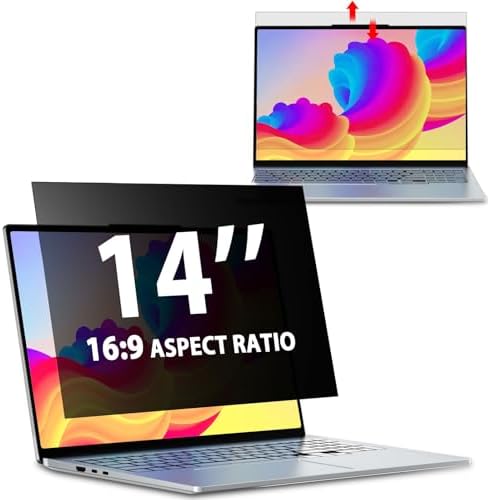
- EASY TO INSTALL:The laptop privacy screen has 2 installation options, you can use 14 inch privacy screen whether your mo...
- EFFECTIVE ANTI-GLARE:The anti-glare technology from Germany AG can reduce the glare above 90 and soften the light, so th...
- WIDELY APPLICABLE:The privacy screen filter 14 inch is modeled on a real machine, the size is 1:1 matching, and it is co...
Top Features to Consider When Choosing a Privacy Screen
When selecting a privacy screen for a laptop, several key features should be taken into account to ensure optimal functionality and user satisfaction. First and foremost, size compatibility is crucial. Privacy screens are designed to fit specific laptop dimensions, and choosing a screen that matches your device's size will enhance the effectiveness of the privacy feature. Typically, privacy screen filters are available for various screen sizes, making it essential to measure your laptop's display accurately before making a purchase.
Another vital aspect is the ease of installation. Many privacy screens come with adhesive strips or slide-mount designs that allow for quick and straightforward application. A user-friendly installation process ensures that you can secure the privacy screen without the need for specialized tools or assistance, enhancing its accessibility.
Screen clarity is also fundamental. A good privacy screen should maintain the sharpness of your display while effectively blocking the view from side angles. Look for models that offer enhanced clarity and do not compromise on the quality of visuals or color accuracy. Additionally, consider the durability of the privacy screen; it should withstand daily use without losing effectiveness or developing scratches easily.
Beyond these core features, many privacy screens also come equipped with additional benefits like blue light filtering and anti-glare properties. Blue light filtering can help reduce eye strain, making it easier to work for extended periods, particularly in low-light conditions. Anti-glare properties further improve visibility by minimizing reflections caused by ambient light, thus ensuring a comfortable user experience in various settings. By evaluating these features, you can make a more informed choice when selecting a privacy screen that meets your specific needs.
Review of the Best Privacy Screens on the Market
The proliferation of mobile work has led to an increased need for privacy screens to protect sensitive information while working in public areas. Below are some of the top privacy screens currently available, highlighting their features, user feedback, and price points.
3M Privacy Filter: Known for its superior technology, 3M's privacy filter utilizes micro-louver technology to provide an effective shield against prying eyes. It is designed to fit snugly on various laptop sizes, with a matte finish that minimizes glare. Users have highlighted its easy installation process and the additional benefit of screen protection against scratches. However, it may slightly alter the screen's brightness. Prices typically range from $30 to $70 depending on size.
Autofull Privacy Screen: This product offers a dual-layer construction that not only protects against visual hackers but also reduces unwanted glare from sunlight, making it ideal for outdoor use. Users appreciate its durability and ease of removal without sticky residue. Nonetheless, some users have noted potential issues regarding color distortion. The price varies from $20 to $60, making it an affordable option for many.
Kensington Privacy Screen: Kensington offers multiple options catering to various laptop models, focusing on both privacy and screen clarity. With its high-definition quality, it minimizes visual distortion while preserving the display's vibrant colors. Reviewers often mention its strong build and functionality; however, its slightly higher price point, which ranges from $50 to $100, can be a consideration for budget-conscious buyers.
In addition to these, other prominent brands include Fellowes and Targus, both known for reliable performance and customer satisfaction ratings. Each privacy screen offers unique benefits and price points, providing users with various options to secure their digital privacy effectively.

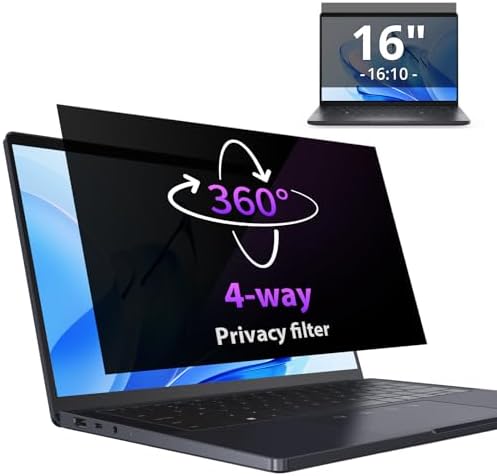
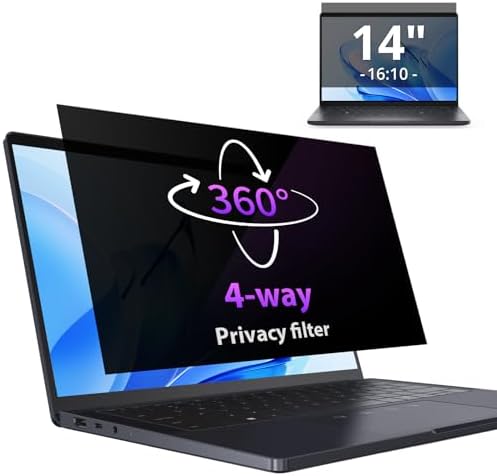


Comparative Analysis: Privacy Screen vs. Other Security Measures
In public spaces, safeguarding personal data is a foremost concern for many users. While there are multiple strategies to secure sensitive information, understanding the unique advantages of privacy screens in comparison to other methods is essential.
Privacy screens serve as a physical barrier that restricts the visibility of laptop displays from side angles, ensuring that unauthorized individuals cannot easily view confidential information. This feature is particularly beneficial in crowded environments such as cafes, airports, or public transport. While a privacy screen primarily focuses on limiting visual access, other techniques provide a broader range of security against data breaches.
Encryption, for example, transforms data into a coded format that is unreadable without the appropriate decryption key. This method provides robust protection against unauthorized access, especially when devices are lost or stolen. However, it does not prevent inquisitive onlookers from viewing information on a screen while you work in public. Thus, while encryption secures data at rest and during transmission, it does not address visual privacy.
Similarly, utilizing Virtual Private Networks (VPNs) encrypts internet traffic and hides your browsing activity on unsecured networks. VPNs are indispensable for protecting sensitive data during online transactions, making it difficult for hackers to intercept information. Yet, again, this does not mitigate the risks associated with prying eyes.
Moreover, employing physical barriers such as positioning oneself strategically or using privacy booths can help in preserving privacy. However, these solutions are often cumbersome and not always feasible. In contrast, a privacy screen is a straightforward, portable solution that can be easily attached and removed, providing instant protection.
Ultimately, combining a privacy screen with encryption and VPN usage creates a more comprehensive security approach, safeguarding both visual and data integrity in public settings. Each method has its own strengths, making it crucial to assess individual needs when determining the best strategy for data protection.
User Experiences: Testimonials and Case Studies
User testimonials and case studies provide valuable insights into the effectiveness of privacy screens for laptops, especially in public settings. Many users have reported that incorporating a privacy screen into their daily routines has significantly enhanced their productivity and comfort while working in cafes, libraries, or airports.
For example, a freelance graphic designer working in a bustling coffee shop shared, "Having a privacy screen has been a game-changer for me. I feel more secure knowing that my design work isn't visible to anyone passing by. It allows me to concentrate better without the constant awareness of prying eyes." This sentiment was echoed by several users who highlighted the increased focus and peace of mind that privacy screens provide in public spaces.
However, not all experiences have been purely positive. A business analyst noted some drawbacks when using a privacy screen during collaborative meetings. "While the privacy screen is fantastic for preventing others from viewing my work, it sometimes makes it difficult for me to share my screen with colleagues. It can also distort colors, which is challenging when reviewing visual data."
Case studies from various environments further illustrate these points. For instance, a university conducted a survey among students using privacy screens in their study areas. Results indicated that nearly 80% felt more secure and focused, although a few students mentioned that the screens could make the display appear dimmer, impacting their ability to view fine details, especially in poorly lit conditions.
These personal accounts and case studies emphasize the necessity of weighing the benefits against potential limitations. Privacy screens can undoubtedly improve the ability to work securely in public spaces, but users must consider their specific needs and surroundings to select the right model.
Tips for Using Privacy Screens Effectively
In today’s digital age, maintaining privacy while using your laptop in public settings is essential. Privacy screens serve as effective tools to prevent unauthorized viewing while allowing you to work securely. To maximize the benefits of a privacy screen, consider the following practical tips.
First, ensure proper installation of your privacy screen. Follow the manufacturer’s instructions carefully, as incorrect installation may lead to reduced effectiveness. Align the screen with your monitor’s display, ensuring no gaps. A well-fitted privacy screen will limit viewing angles, thereby enhancing your privacy.
Maintaining your privacy screen is equally important. Regularly clean it with a microfiber cloth specifically designed for electronics. Avoid abrasive cleaners or materials that could scratch the surface or impair the screen’s functionality. In addition, always store your privacy screen in a protective case when not in use to prevent physical damage.
Integrating a privacy screen with other security measures strengthens your overall protection. Consider utilizing a password manager and enabling screen lock features on your device. These practices add layers of security that complement the visual barriers provided by the privacy screen. Furthermore, configuring your laptop to display sensitive information only on demand enhances security without compromising convenience.
Being aware of your surroundings is a fundamental practice when working in public spaces. Position yourself to minimize the potential for people to glance at your screen. Choose seating where you have a clear view of entry points while limiting visibility from other angles. This spatial awareness, combined with the use of a privacy screen, ensures a more secure working environment.
By implementing these strategies, laptop users can confidently navigate public spaces without compromising their privacy. Taking a comprehensive approach to privacy screen usage not only protects sensitive information but also contributes to a more secure working experience.
Conclusion: Making the Right Choice for Your Privacy Needs
In today’s increasingly interconnected world, the ability to maintain privacy while working in public spaces has become a significant concern for many individuals. Investing in a quality privacy screen for laptops is not merely a convenience but a crucial step toward enhancing personal and professional security. With diverse options available to cater to every preference, it is essential to consider various factors when making a choice.
Primarily, understanding the nature of your work environment is vital. If you often find yourself in busy cafés, offices, or airports where shoulder surfing is a risk, a suitable privacy screen can drastically reduce the likelihood of unauthorized individuals viewing your screen. These screens typically come with varying levels of privacy protection, and selecting one that aligns with your needs is fundamental.
Moreover, the ease of installation and removal should not be overlooked. Many privacy screens are designed for seamless attachment to laptops, allowing users the flexibility to adjust their privacy settings depending on their surroundings. Additionally, the screen's effect on display quality can influence your working experience; thus, it is prudent to look for products that maintain true colors and clarity while providing privacy.
Ultimately, assessing your specific requirements—such as the nature of your work, the typical environments in which you operate, and how often you travel—will guide you in selecting the most appropriate privacy screen. By prioritizing these factors, you can make an informed decision that not only secures your confidential information but also enhances your overall productivity and comfort while working in public spaces. Taking these considerations seriously serves as a proactive measure in safeguarding your privacy.

0 Comments